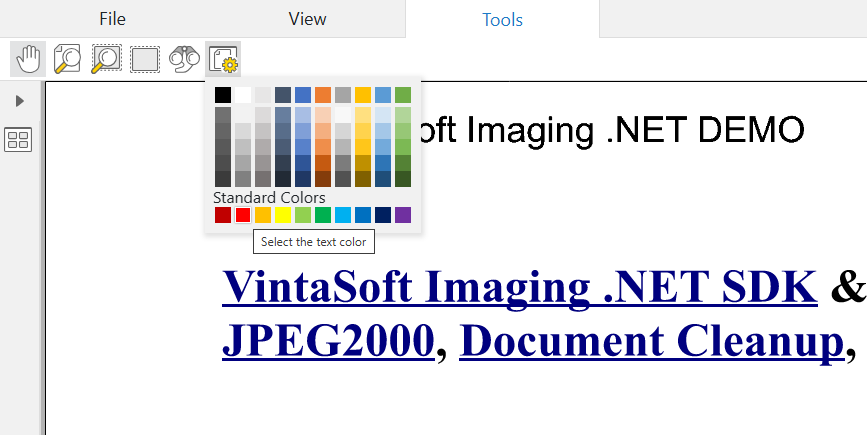
Create button with color picker for Web Document Viewer UI
In This Topic
Here is JavaScript code that shows how to create button with color picker and add created button to the "Tools" menu in VintaSoft web document viewer:
/**
 Initializes main menu of Vintasoft web document viewer.
 @param {object} docViewerSettings Settings of Vintasoft web document viewer.
*/
function __initMenu(docViewerSettings) {
    // get items of document viewer
    var items = docViewerSettings.get_Items();

    // get the main menu of document viewer
    var mainMenu = items.getItemByRegisteredId("mainMenu");
    // if main menu is found
    if (mainMenu != null) {
        // get items of main menu
        var mainMenuItems = mainMenu.get_Items();

        // get "Tools" menu in web document viewer
        var toolsToolbarPanel = mainMenuItems.getItemByRegisteredId("toolsMenuPanel");
        // get items of "Tools" menu
        var toolsToolbarPanelItems = toolsToolbarPanel.get_Items();

        // create button with color picker
        var buttonWithColorPicker1 = new Vintasoft.Imaging.UI.UIElements.WebUiButtonWithColorPickerJS({
            cssClass: "vsui-button vsdv-imageViewerSettingsButton",
            title: "Select the text color",
            localizationId: "selectTextColorButton",
            initialColor: '#FF0000',
            showColorOnButton: false
        });
        // subscribe to the "colorChanged" event of button
        Vintasoft.Shared.subscribeToEvent(buttonWithColorPicker1, "colorChanged", function (event, eventArgs) {
            function argbIntToColor(argbInt) {
                // ensure the number is treated as an unsigned 32-bit integer
                argbInt >>>= 0;

                // extract the components using bitwise shifts and masks
                const b = argbInt & 0xFF; // Blue component
                const g = (argbInt & 0xFF00) >>> 8; // Green component
                const r = (argbInt & 0xFF0000) >>> 16; // Red component
                const a = ((argbInt & 0xFF000000) >>> 24) / 255; // Alpha component (normalized to 0-1)

                // return the color in the CSS rgba() string format
                return "rgba(" + r + ", " + g + ", " + b + ", " + a.toFixed(2) + ")";
            }


            // get integer ARGB value
            var argbIntValue = eventArgs.color;
            // convert integer ARGB value to a color value
            var colorValue = argbIntToColor(argbIntValue);
            alert("Color is selected: " + colorValue);
        });

        // add button with color picker to the "Tools" menu in web document viewer
        toolsToolbarPanelItems.addItem(buttonWithColorPicker1);
    }
}
Here is screenshot of VintaSoft web document viewer with button with color picker, which was created using JS-code above: