Web Document Editor
In This Topic
VintaSoft Web Document Editor is a JavaScript UI control (WebDocumentEditorJS class) that allows to load, view, print, edit and save DOCX document.
VintaSoft Web Document Editor can be quickly and easily integrated into modern web application for desktops, tablets and smartphones.
VintaSoft Web Document Editor code is located in Vintasoft.Imaging.Office.js script.
VintaSoft Web Document Editor uses:
- UI elements from Vintasoft.Imaging.js and Vintasoft.Imaging.Office.js scripts for constructing the UI
- Web document editor control (WebDocumentEditorControlJS class) from Vintasoft.Imaging.Office.js script for viewing and editing the DOCX document
- JavaScript classes from Vintasoft.Shared.js and Vintasoft.Imaging.js scripts for loading and saving of DOCX document
By default the VintaSoft Web Document Editor consists from the following parts:
- Main menu, which has horizontal orientation and aligned to the top side of the control's container. The borders of main menu are marked in red on the images below.
- Bottom panel, which is aligned to the bottom part of the control's container. The borders of bottom panel are marked in green on the images below.
- Document editor control, which occupies all free space of the document editor's container.
Here is the screenshot of web document editor on desktop computer:
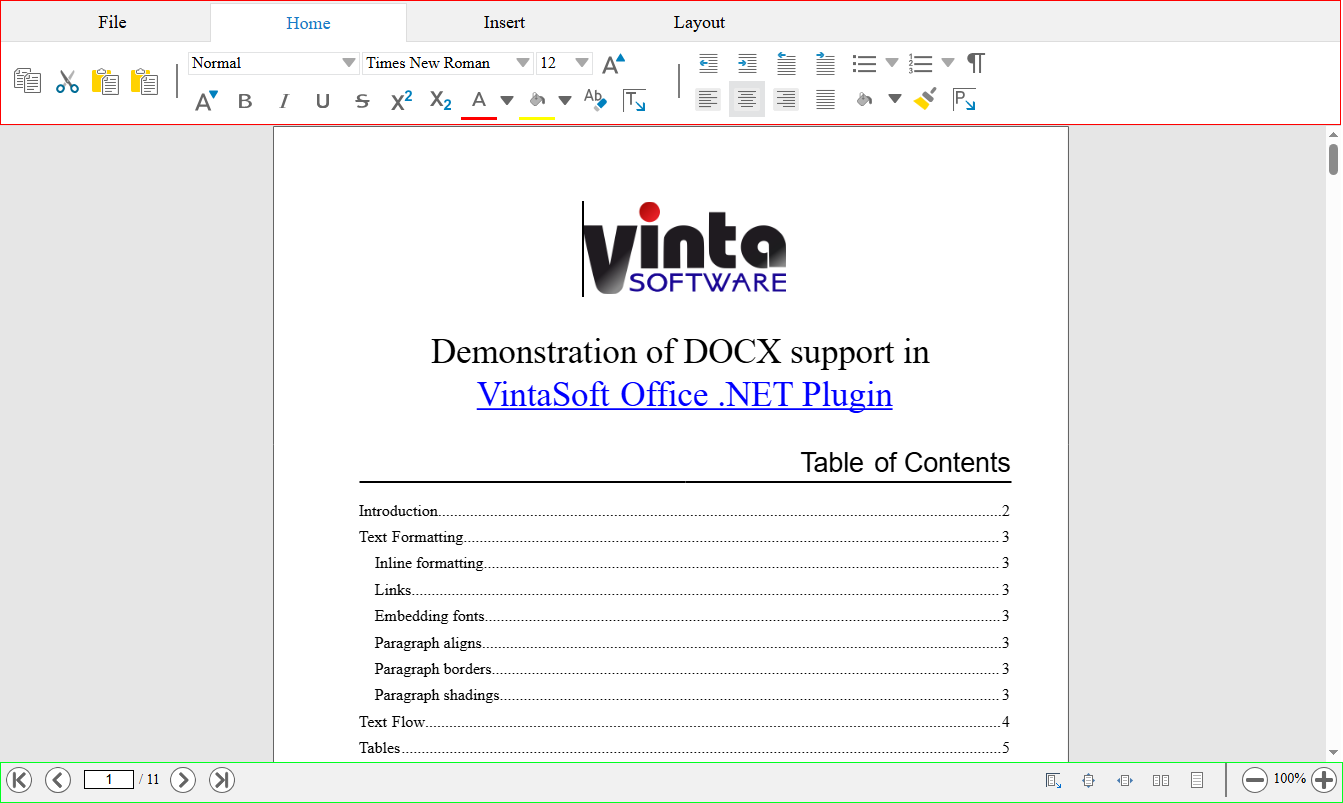
The user interface (UI) of VintaSoft Web Document Editor can be customized for any task. Detailed information please read here.