DOCX: Edit a DOCX document in WinForms document editor control
In This Topic
The DocumentEditor control is a WinForms control that allows to view and edit a DOCX document.
The DocumentEditor control allows to:
- Create a new or open an existing DOCX document in document editor control
- Display and print document
- Add/change/delete text content in document
- Change text properties (font, font size, bold, italic, text color, ...) in a document
- Change paragraph properties (style, text alignment, text indent, list style, ...) in a document
- Insert/delete page break
- Add/edit/delete header or footer
- Change page settings
- Change settings of page columns
- Save changes in DOCX document
- Export DOCX document to a PDF format
If you want to use the DocumentEditor control in your WinForms application, you need License for VintaSoft Office .NET Plug-in ("Reader+Writer" and "Visual Editor" edition).
Here is screenshot of "VintaSoft Document Editor Demo" that uses DocumentEditor control:
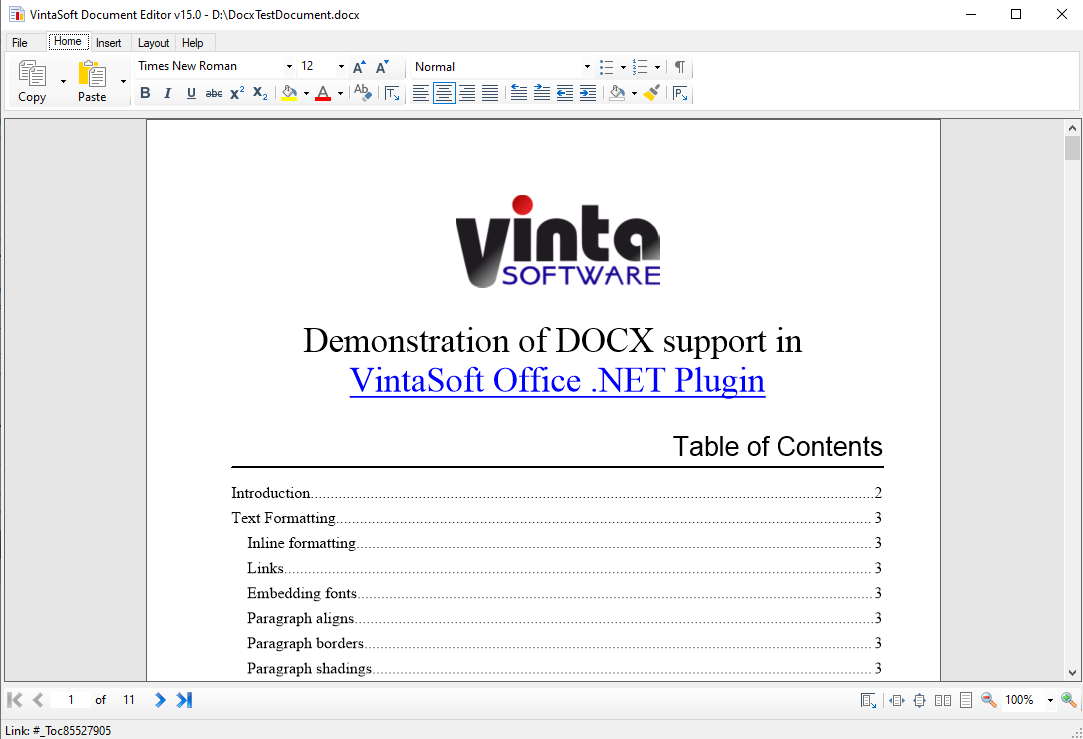
Source codes of "VintaSoft Document Editor Demo" can be found in installation of VintaSoft Imaging .NET SDK: "<SdkInstallPath>\VintaSoft\Imaging .NET 15.1\Examples\WinForms\CSharp\DocumentEditorDemo\"