VintaSoft Imaging .NET SDK 15.1: Documentation for .NET developer
Vintasoft.Imaging.Pdf.Drawing Namespace / PdfGraphics Class
Members Object Syntax Remarks Example Hierarchy Requirements SeeAlso
In This Topic
PdfGraphics Class
In This Topic
Encapsulates a PDF drawing surface.
Object Model
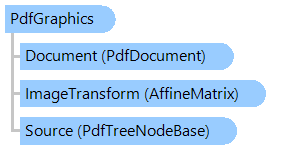
AffineMatrix PdfDocument PdfTreeNodeBase PdfGraphics
Syntax
'Declaration

Public NotInheritable Class PdfGraphics

public sealed class PdfGraphics

Remarks

Important: All point coordinates should be specified in Cartesian coordinates (X axis goes from left to right, Y axis goes from bottom to top).

Important: All operations are vector operations, background bitmap has resolution 72 dpi.

Example

Here is an example that shows how to draw the graphical primitives on a PDF page:


Public Shared Sub TestPDFGraphics(pdfFileName As String)
    ' create new PDF document
    Dim document As New Vintasoft.Imaging.Pdf.PdfDocument()
    ' add new page
    document.Pages.Add(New System.Drawing.SizeF(1000, 1000))
    ' get graphics object associated with page
    Using graphics As Vintasoft.Imaging.Pdf.Drawing.PdfGraphics = document.Pages(0).GetGraphics()
        ' draw primitives
        Dim pen As New Vintasoft.Imaging.Pdf.Drawing.PdfPen(System.Drawing.Color.Red)
        pen.Width = 3
        Dim brush As New Vintasoft.Imaging.Pdf.Drawing.PdfBrush(System.Drawing.Color.Green)
        graphics.DrawLine(pen, 0, 0, 50, 150)
        graphics.DrawCurve(pen, 50, 150, 100, 200, 200, _
            20, 300, 150)
        pen.Color = System.Drawing.Color.Blue
        graphics.DrawEllipse(pen, 400, 400, 200, 300)
        graphics.FillEllipse(brush, 500, 500, 70, 150)
        brush.Color = System.Drawing.Color.FromArgb(127, System.Drawing.Color.Red)
        graphics.FillRectangle(brush, 450, 550, 300, 300)
        pen.Width = 10
        graphics.DrawRectangle(pen, 0, 0, 1000, 1000)

        ' draw vector string
        brush.Color = System.Drawing.Color.Green
        Dim font As Vintasoft.Imaging.Drawing.IDrawingFont = Vintasoft.Imaging.Drawing.DrawingFactory.[Default].CreateGenericSansSerifFont(30)
        graphics.DrawString("Vector string", font, brush, New System.Drawing.PointF(100, 500))
        Dim pdfFont As Vintasoft.Imaging.Pdf.Tree.Fonts.PdfFont = document.FontManager.GetStandardFont(Vintasoft.Imaging.Pdf.Tree.Fonts.PdfStandardFontType.TimesRoman)
        ' draw text string
        graphics.DrawString("Text string", pdfFont, 30, brush, New System.Drawing.PointF(100, 600))
    End Using

    ' get graphics object associated with page
    Using graphics As Vintasoft.Imaging.Pdf.Drawing.PdfGraphics = document.Pages(0).GetGraphics()
        ' draw rendered page image (500x500 pixels) onto page
        Using img As Vintasoft.Imaging.VintasoftImage = document.Pages(0).Render(500, 500)
            graphics.DrawImage(img, New System.Drawing.RectangleF(600, 0, 300, 300))
        End Using
    End Using

    ' save document
    document.SaveChanges(pdfFileName)

    ' close document
    document.Dispose()
End Sub

public static void TestPDFGraphics(string pdfFileName)
{
    // create new PDF document
    Vintasoft.Imaging.Pdf.PdfDocument document = 
        new Vintasoft.Imaging.Pdf.PdfDocument();
    // add new page
    document.Pages.Add(new System.Drawing.SizeF(1000, 1000));
    // get graphics object associated with page
    using (Vintasoft.Imaging.Pdf.Drawing.PdfGraphics graphics = document.Pages[0].GetGraphics())
    {
        // draw primitives
        Vintasoft.Imaging.Pdf.Drawing.PdfPen pen = 
            new Vintasoft.Imaging.Pdf.Drawing.PdfPen(System.Drawing.Color.Red);
        pen.Width = 3;
        Vintasoft.Imaging.Pdf.Drawing.PdfBrush brush = 
            new Vintasoft.Imaging.Pdf.Drawing.PdfBrush(System.Drawing.Color.Green);
        graphics.DrawLine(pen, 0, 0, 50, 150);
        graphics.DrawCurve(pen, 50, 150, 100, 200, 200, 20, 300, 150);
        pen.Color = System.Drawing.Color.Blue;
        graphics.DrawEllipse(pen, 400, 400, 200, 300);
        graphics.FillEllipse(brush, 500, 500, 70, 150);
        brush.Color = System.Drawing.Color.FromArgb(127, System.Drawing.Color.Red);
        graphics.FillRectangle(brush, 450, 550, 300, 300);
        pen.Width = 10;
        graphics.DrawRectangle(pen, 0, 0, 1000, 1000);

        // draw vector string
        brush.Color = System.Drawing.Color.Green;
        Vintasoft.Imaging.Drawing.IDrawingFont font = Vintasoft.Imaging.Drawing.DrawingFactory.Default.CreateGenericSansSerifFont(30);
        graphics.DrawString("Vector string", font, brush, new System.Drawing.PointF(100, 500));
        Vintasoft.Imaging.Pdf.Tree.Fonts.PdfFont pdfFont = document.FontManager.GetStandardFont(
            Vintasoft.Imaging.Pdf.Tree.Fonts.PdfStandardFontType.TimesRoman);
        // draw text string
        graphics.DrawString("Text string", pdfFont, 30, brush, new System.Drawing.PointF(100, 600));
    }

    // get graphics object associated with page
    using (Vintasoft.Imaging.Pdf.Drawing.PdfGraphics graphics = document.Pages[0].GetGraphics())
    {
        // draw rendered page image (500x500 pixels) onto page
        using (Vintasoft.Imaging.VintasoftImage img = document.Pages[0].Render(500, 500))
            graphics.DrawImage(img, new System.Drawing.RectangleF(600, 0, 300, 300));
    }

    // save document
    document.SaveChanges(pdfFileName);

    // close document
    document.Dispose();
}

Inheritance Hierarchy

System.Object
   Vintasoft.Imaging.Pdf.Drawing.PdfGraphics

Requirements

Target Platforms: .NET 10; .NET 9; .NET 8; .NET 7; .NET 6; .NET Framework 4.8, 4.7, 4.6, 4.5, 4.0, 3.5

See Also