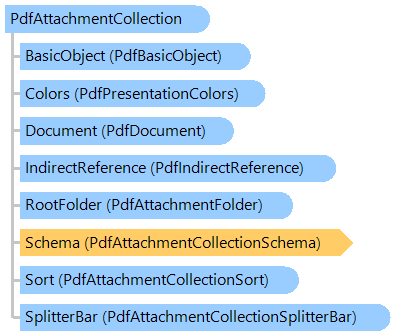
PdfAttachmentCollection Class
In This Topic
Represents a collections of file attachments, where the attachments are related in structure or content.
Object Model
Syntax
'Declaration

Public Class PdfAttachmentCollection
   Inherits Vintasoft.Imaging.Pdf.Tree.PdfTreeNodeBase
public class PdfAttachmentCollection : Vintasoft.Imaging.Pdf.Tree.PdfTreeNodeBase
public __gc class PdfAttachmentCollection : public Vintasoft.Imaging.Pdf.Tree.PdfTreeNodeBase*
public ref class PdfAttachmentCollection : public Vintasoft.Imaging.Pdf.Tree.PdfTreeNodeBase^
Remarks
Beginning with PDF 1.7, PDF documents can specify how a viewer application's user interface presents collections of file attachments (Portfolio), where the attachments are related in structure or content. Such a presentation is called a portable collection. The intent of portable collections is to present, sort, and search collections of related documents, such as email archives, photo collections, and etc. If attachment is present in a PDF document, the user interface presents the document as an attachment collection.
Beginning with PDF 1.7 ExtensionLevel 3, an attachment collection can contain a folders for the purpose of organizing files into a hierarchical structure. The structure is represented by a tree with a single root folder (RootFolder) acting as the common ancestor for all other folders and files in the collection.
Example
Here is an example that shows how to get information about attachments of PDF document:
''' <summary>
''' Prints the portfolio structure.
''' </summary>
''' <param name="pdfFilename">The PDF filename.</param>
Public Shared Sub PrintPortfolioStructure(pdfFilename As String)
    ' open PDF document in read-only mode
    Using document As New Vintasoft.Imaging.Pdf.PdfDocument(pdfFilename, True)
        ' if PDF document does not contain portfolio
        If document.Attachments Is Nothing Then
            System.Console.WriteLine("Document does not have attachments (portfolio).")
            Return
        End If

        ' print initial view mode
        System.Console.WriteLine(String.Format("Initial View Mode = {0}", document.Attachments.View))

        ' print colors information
        If document.Attachments.Colors IsNot Nothing Then
            PrintPortfolioColors(document.Attachments.Colors)
        End If

        ' print portfolio schema
        If document.Attachments.Schema IsNot Nothing Then
            PrintPortfolioSchema(document.Attachments.Schema)
        End If

        ' print portfolio sort settings
        If document.Attachments.Sort IsNot Nothing Then
            PrintPortfolioSort(document.Attachments.Sort)
        End If

        ' print portfolio splitter bar settings
        If document.Attachments.SplitterBar IsNot Nothing Then
            PrintPortfolioSplitterBar(document.Attachments.SplitterBar)
        End If

        ' print portfolio folders and files
        If document.Attachments.RootFolder IsNot Nothing Then
            System.Console.WriteLine("Folder structure:")
            PrintFolderStructure(document.Attachments.RootFolder, "  ")
        Else
            System.Console.WriteLine("Files:")
            PrintFileInfo(document.Attachments.GetFiles(""), "  ")
        End If
    End Using
End Sub

''' <summary>
''' Prints the folder structure.
''' </summary>
''' <param name="folder">The PDF attachment folder.</param>
''' <param name="padding">Padding.</param>
Private Shared Sub PrintFolderStructure(folder As Vintasoft.Imaging.Pdf.Tree.FileAttachments.PdfAttachmentFolder, padding As String)
    System.Console.WriteLine(String.Format("{0}Folder: {1}", padding, folder.Name))
    padding += "  "
    PrintFileInfo(folder.Files, padding)
    Dim subFolders As Vintasoft.Imaging.Pdf.Tree.FileAttachments.PdfAttachmentFolder() = folder.Folders
    If subFolders IsNot Nothing Then
        For Each subFolder As Vintasoft.Imaging.Pdf.Tree.FileAttachments.PdfAttachmentFolder In subFolders
            PrintFolderStructure(subFolder, padding)
        Next
    End If
End Sub

''' <summary>
''' Prints the portfolio splitter bar information.
''' </summary>
''' <param name="splitterBar">The splitter bar.</param>
Private Shared Sub PrintPortfolioSplitterBar(splitterBar As Vintasoft.Imaging.Pdf.Tree.FileAttachments.PdfAttachmentCollectionSplitterBar)
    System.Console.WriteLine("Splitter Bar:")
    System.Console.WriteLine(String.Format("  Direction = {0}", splitterBar.Direction))
    System.Console.WriteLine(String.Format("  Position  = {0}", splitterBar.Position))
End Sub

''' <summary>
''' Prints an information for specified files.
''' </summary>
''' <param name="fileSpecs">The PDF embedded file specifications.</param>
''' <param name="padding">Padding.</param>
Private Shared Sub PrintFileInfo(fileSpecs As Vintasoft.Imaging.Pdf.Tree.PdfEmbeddedFileSpecification(), padding As String)
    For Each fileSpec As Vintasoft.Imaging.Pdf.Tree.PdfEmbeddedFileSpecification In fileSpecs
        System.Console.WriteLine(String.Format("{0}File: {1}", padding, fileSpec.Filename))
        System.Console.WriteLine(String.Format("{0}  CompressedSize   = {1}", padding, fileSpec.CompressedSize))
        System.Console.WriteLine(String.Format("{0}  UncompressedSize = {1}", padding, fileSpec.UncompressedSize))
        System.Console.WriteLine(String.Format("{0}  Compression      = {1}", padding, fileSpec.Compression))
        System.Console.WriteLine(String.Format("{0}  CreationDate     = {1}", padding, fileSpec.CreationDate))
        System.Console.WriteLine(String.Format("{0}  ModificationDate = {1}", padding, fileSpec.ModificationDate))
        System.Console.WriteLine(String.Format("{0}  Description      = {1}", padding, fileSpec.Description))
        System.Console.WriteLine(String.Format("{0}  HasThumbnail     = {1}", padding, fileSpec.Thumbnail IsNot Nothing))
        If fileSpec.DataFields IsNot Nothing Then
            System.Console.WriteLine("    DataFields:")
            For Each name As String In fileSpec.DataFields.Keys
                System.Console.WriteLine(String.Format("      {0}={1}", name, fileSpec.DataFields(name).DataAsString))
            Next
        End If
    Next
End Sub

''' <summary>
''' Prints the portfolio sort properties.
''' </summary>
''' <param name="sort">The PDF attachment collection sort properties.</param>
Private Shared Sub PrintPortfolioSort(sort As Vintasoft.Imaging.Pdf.Tree.FileAttachments.PdfAttachmentCollectionSort)
    System.Console.WriteLine("Sort:")
    System.Console.WriteLine("  Field names:")
    Dim fieldNames As String() = sort.FieldNames
    For i As Integer = 0 To fieldNames.Length - 1
        System.Console.WriteLine("    {0}: {1}", i, fieldNames(i))
    Next

    System.Console.WriteLine("  Ascending orders:")
    Dim ascendingOrders As Boolean() = sort.AscendingOrders
    For i As Integer = 0 To ascendingOrders.Length - 1
        System.Console.WriteLine("    {0}: {1}", i, ascendingOrders(i))
    Next
End Sub

''' <summary>
''' Prints the portfolio schema.
''' </summary>
''' <param name="schema">The PDF attachment collection schema.</param>
Private Shared Sub PrintPortfolioSchema(schema As Vintasoft.Imaging.Pdf.Tree.FileAttachments.PdfAttachmentCollectionSchema)
    System.Console.WriteLine("Schema:")
    For Each key As String In schema.Keys
        System.Console.WriteLine(String.Format("  {0}:", key))
        Dim field As Vintasoft.Imaging.Pdf.Tree.FileAttachments.PdfAttachmentCollectionSchemaField = schema(key)
        System.Console.WriteLine("    DataType          = {0}", field.DataType)
        System.Console.WriteLine("    DisplayedName     = {0}", field.DisplayedName)
        System.Console.WriteLine("    IsSupportsEditing = {0}", field.IsSupportsEditing)
        System.Console.WriteLine("    IsVisible         = {0}", field.IsVisible)
        System.Console.WriteLine("    Order             = {0}", field.Order)
    Next
End Sub

''' <summary>
''' Prints the portfolio colors information.
''' </summary>
''' <param name="presentationColors">The presentation colors.</param>
Private Shared Sub PrintPortfolioColors(presentationColors As Vintasoft.Imaging.Pdf.Tree.FileAttachments.PdfPresentationColors)
    System.Console.WriteLine("Colors:")
    System.Console.WriteLine(String.Format("  Background     = {0}", presentationColors.Background))
    System.Console.WriteLine(String.Format("  CardBackground = {0}", presentationColors.CardBackground))
    System.Console.WriteLine(String.Format("  CardBorder     = {0}", presentationColors.CardBorder))
    System.Console.WriteLine(String.Format("  PrimaryText    = {0}", presentationColors.PrimaryText))
    System.Console.WriteLine(String.Format("  SecondaryText  = {0}", presentationColors.SecondaryText))
End Sub
/// <summary>
/// Prints the portfolio structure.
/// </summary>
/// <param name="pdfFilename">The PDF filename.</param>
public static void PrintPortfolioStructure(string pdfFilename)
{
    // open PDF document in read-only mode
    using (Vintasoft.Imaging.Pdf.PdfDocument document =
        new Vintasoft.Imaging.Pdf.PdfDocument(pdfFilename, true))
    {
        // if PDF document does not contain portfolio
        if (document.Attachments == null)
        {
            System.Console.WriteLine("Document does not have attachments (portfolio).");
            return;
        }

        // print initial view mode
        System.Console.WriteLine(string.Format("Initial View Mode = {0}", document.Attachments.View));

        // print colors information
        if (document.Attachments.Colors != null)
            PrintPortfolioColors(document.Attachments.Colors);

        // print portfolio schema
        if (document.Attachments.Schema != null)
            PrintPortfolioSchema(document.Attachments.Schema);

        // print portfolio sort settings
        if (document.Attachments.Sort != null)
            PrintPortfolioSort(document.Attachments.Sort);

        // print portfolio splitter bar settings
        if (document.Attachments.SplitterBar != null)
            PrintPortfolioSplitterBar(document.Attachments.SplitterBar);

        // print portfolio folders and files
        if (document.Attachments.RootFolder != null)
        {
            System.Console.WriteLine("Folder structure:");
            PrintFolderStructure(document.Attachments.RootFolder, "  ");
        }
        else
        {
            System.Console.WriteLine("Files:");
            PrintFileInfo(document.Attachments.GetFiles(""), "  ");
        }
    }
}

/// <summary>
/// Prints the folder structure.
/// </summary>
/// <param name="folder">The PDF attachment folder.</param>
/// <param name="padding">Padding.</param>
private static void PrintFolderStructure(
    Vintasoft.Imaging.Pdf.Tree.FileAttachments.PdfAttachmentFolder folder, string padding)
{
    System.Console.WriteLine(string.Format("{0}Folder: {1}", padding, folder.Name));
    padding += "  ";
    PrintFileInfo(folder.Files, padding);
    Vintasoft.Imaging.Pdf.Tree.FileAttachments.PdfAttachmentFolder[] subFolders = folder.Folders;
    if (subFolders != null)
    {
        foreach (Vintasoft.Imaging.Pdf.Tree.FileAttachments.PdfAttachmentFolder subFolder in subFolders)
            PrintFolderStructure(subFolder, padding);
    }
}

/// <summary>
/// Prints the portfolio splitter bar information.
/// </summary>
/// <param name="splitterBar">The splitter bar.</param>
private static void PrintPortfolioSplitterBar(
    Vintasoft.Imaging.Pdf.Tree.FileAttachments.PdfAttachmentCollectionSplitterBar splitterBar)
{
    System.Console.WriteLine("Splitter Bar:");
    System.Console.WriteLine(string.Format("  Direction = {0}", splitterBar.Direction));
    System.Console.WriteLine(string.Format("  Position  = {0}", splitterBar.Position));
}

/// <summary>
/// Prints an information for specified files.
/// </summary>
/// <param name="fileSpecs">The PDF embedded file specifications.</param>
/// <param name="padding">Padding.</param>
private static void PrintFileInfo(
    Vintasoft.Imaging.Pdf.Tree.PdfEmbeddedFileSpecification[] fileSpecs, string padding)
{
    foreach (Vintasoft.Imaging.Pdf.Tree.PdfEmbeddedFileSpecification fileSpec in fileSpecs)
    {
        System.Console.WriteLine(string.Format("{0}File: {1}", padding, fileSpec.Filename));
        System.Console.WriteLine(string.Format("{0}  CompressedSize   = {1}", padding, fileSpec.CompressedSize));
        System.Console.WriteLine(string.Format("{0}  UncompressedSize = {1}", padding, fileSpec.UncompressedSize));
        System.Console.WriteLine(string.Format("{0}  Compression      = {1}", padding, fileSpec.Compression));
        System.Console.WriteLine(string.Format("{0}  CreationDate     = {1}", padding, fileSpec.CreationDate));
        System.Console.WriteLine(string.Format("{0}  ModificationDate = {1}", padding, fileSpec.ModificationDate));
        System.Console.WriteLine(string.Format("{0}  Description      = {1}", padding, fileSpec.Description));
        System.Console.WriteLine(string.Format("{0}  HasThumbnail     = {1}", padding, fileSpec.Thumbnail != null));
        if (fileSpec.DataFields != null)
        {
            System.Console.WriteLine("    DataFields:");
            foreach (string name in fileSpec.DataFields.Keys)
            {
                System.Console.WriteLine(string.Format("      {0}={1}", name,
                    fileSpec.DataFields[name].DataAsString));
            }
        }
    }
}

/// <summary>
/// Prints the portfolio sort properties.
/// </summary>
/// <param name="sort">The PDF attachment collection sort properties.</param>
private static void PrintPortfolioSort(
    Vintasoft.Imaging.Pdf.Tree.FileAttachments.PdfAttachmentCollectionSort sort)
{
    System.Console.WriteLine("Sort:");
    System.Console.WriteLine("  Field names:");
    string[] fieldNames = sort.FieldNames;
    for (int i = 0; i < fieldNames.Length; i++)
        System.Console.WriteLine("    {0}: {1}", i, fieldNames[i]);

    System.Console.WriteLine("  Ascending orders:");
    bool[] ascendingOrders = sort.AscendingOrders;
    for (int i = 0; i < ascendingOrders.Length; i++)
        System.Console.WriteLine("    {0}: {1}", i, ascendingOrders[i]);
}

/// <summary>
/// Prints the portfolio schema.
/// </summary>
/// <param name="schema">The PDF attachment collection schema.</param>
private static void PrintPortfolioSchema(
    Vintasoft.Imaging.Pdf.Tree.FileAttachments.PdfAttachmentCollectionSchema schema)
{
    System.Console.WriteLine("Schema:");
    foreach (string key in schema.Keys)
    {
        System.Console.WriteLine(string.Format("  {0}:", key));
        Vintasoft.Imaging.Pdf.Tree.FileAttachments.PdfAttachmentCollectionSchemaField field = schema[key];
        System.Console.WriteLine("    DataType          = {0}", field.DataType);
        System.Console.WriteLine("    DisplayedName     = {0}", field.DisplayedName);
        System.Console.WriteLine("    IsSupportsEditing = {0}", field.IsSupportsEditing);
        System.Console.WriteLine("    IsVisible         = {0}", field.IsVisible);
        System.Console.WriteLine("    Order             = {0}", field.Order);
    }
}

/// <summary>
/// Prints the portfolio colors information.
/// </summary>
/// <param name="presentationColors">The presentation colors.</param>
private static void PrintPortfolioColors(
    Vintasoft.Imaging.Pdf.Tree.FileAttachments.PdfPresentationColors presentationColors)
{
    System.Console.WriteLine("Colors:");
    System.Console.WriteLine(string.Format("  Background     = {0}", presentationColors.Background));
    System.Console.WriteLine(string.Format("  CardBackground = {0}", presentationColors.CardBackground));
    System.Console.WriteLine(string.Format("  CardBorder     = {0}", presentationColors.CardBorder));
    System.Console.WriteLine(string.Format("  PrimaryText    = {0}", presentationColors.PrimaryText));
    System.Console.WriteLine(string.Format("  SecondaryText  = {0}", presentationColors.SecondaryText));
}
Inheritance Hierarchy
System.Object
Vintasoft.Imaging.Pdf.Tree.PdfTreeNodeBase
Vintasoft.Imaging.Pdf.Tree.FileAttachments.PdfAttachmentCollection
Requirements
Target Platforms: .NET 10; .NET 9; .NET 8; .NET 7; .NET 6; .NET Framework 4.8, 4.7, 4.6, 4.5, 4.0, 3.5
See Also
Reference
PdfAttachmentCollection Members
Vintasoft.Imaging.Pdf.Tree.FileAttachments Namespace
Extensions