In This Topic
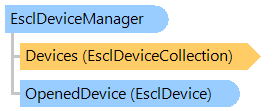
Represents a manager of eSCL devices.
Object Model
Syntax
'Declaration

Public NotInheritable Class EsclDeviceManager
public sealed class EsclDeviceManager
public __gc __sealed class EsclDeviceManager
public ref class EsclDeviceManager sealed
Example
This C#/VB.NET code shows how to open eSCL device manager and display information about available eSCL image scanners.
''' <summary>
''' Opens eSCL device manager and displays information about available local eSCL image scanners.
''' </summary>
Private Sub GetEsclDevicesInfo()
    ' create eSCL device manager
    Using deviceManager As New Vintasoft.EsclImageScanning.EsclDeviceManager()
        ' open device manager
        deviceManager.Open()

        ' wait while the eSCL device manager searches for eSCL devices
        System.Threading.Thread.Sleep(deviceManager.DeviceSearchTimeout)
        ' get count of eSCL devices
        Dim deviceCount As Integer = deviceManager.Devices.Count
        If deviceCount = 0 Then
            System.Console.WriteLine("Devices are not found.")
            Return
        End If

        Dim devices As Vintasoft.EsclImageScanning.EsclDeviceCollection = deviceManager.Devices
        ' for each eSCL device
        For i As Integer = 0 To devices.Count - 1
            ' output the device name
            System.Console.WriteLine(String.Format("Device '{0}'", devices(i).Name))
        Next
    End Using
End Sub
/// <summary>
/// Opens eSCL device manager and displays information about available local eSCL image scanners.
/// </summary>
void GetEsclDevicesInfo()
{
    // create eSCL device manager
    using (Vintasoft.EsclImageScanning.EsclDeviceManager deviceManager = new Vintasoft.EsclImageScanning.EsclDeviceManager())
    {
        // open device manager
        deviceManager.Open();

        // wait while the eSCL device manager searches for eSCL devices
        System.Threading.Thread.Sleep(deviceManager.DeviceSearchTimeout);
        // get count of eSCL devices
        int deviceCount = deviceManager.Devices.Count;
        if (deviceCount == 0)
        {
            System.Console.WriteLine("Devices are not found.");
            return;
        }

        Vintasoft.EsclImageScanning.EsclDeviceCollection devices = deviceManager.Devices;
        // for each eSCL device
        for (int i = 0; i < devices.Count; i++)
        {
            // output the device name
            System.Console.WriteLine(string.Format("Device '{0}'", devices[i].Name));
        }
    }
}
Inheritance Hierarchy
System.Object
Vintasoft.EsclImageScanning.EsclDeviceManager
Requirements
Target Platforms: .NET 11; .NET 10; .NET 9; .NET 8; .NET 6; .NET Framework 4.8, 4.7, 4.6, 4.5
See Also