.NET에서 OMR 버블 시트의 생년월일 인식
2020/08/20

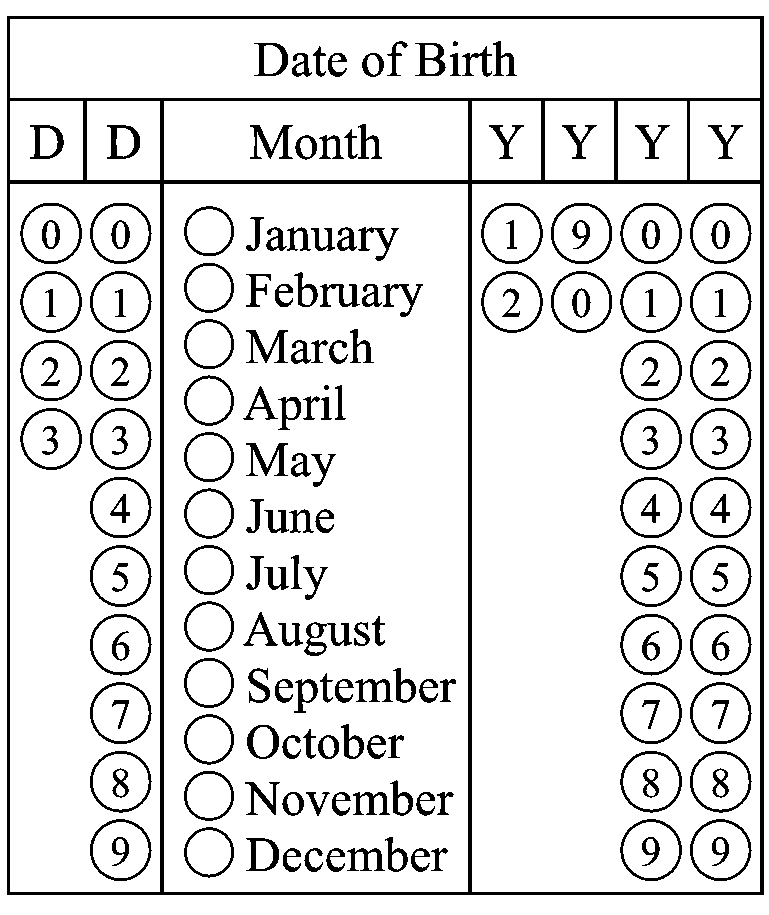
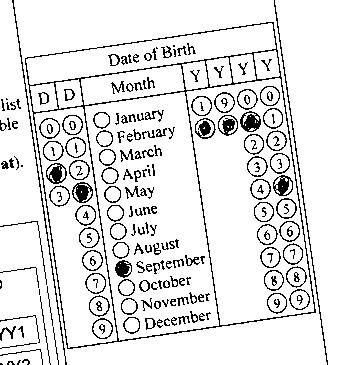
/// <summary>
/// Creates a page template with birth date.
/// </summary>
/// <returns>A page template with birth date.</returns>
private static Vintasoft.Imaging.FormsProcessing.FormRecognition.FormPageTemplate CreatePageTemplateWithBirthDate()
{
    // create an OMR field template table for the first digit of day
    Vintasoft.Imaging.FormsProcessing.FormRecognition.Omr.OmrFieldTemplateTable dayPart1Template = CreateTemplateTableForFirstDigitInDay();
    // create an OMR field template table for the second digit of day
    Vintasoft.Imaging.FormsProcessing.FormRecognition.Omr.OmrFieldTemplateTable dayPart2Template = CreateTemplateTableForSecondDigitInDay();
    // create a form field template group for day
    Vintasoft.Imaging.FormsProcessing.FormRecognition.FormFieldTemplateGroup dayTemplate = CreateTemplateGroup(
        "Day", "{0}{1}", dayPart1Template, dayPart2Template);


    // create an OMR field template table for month
    Vintasoft.Imaging.FormsProcessing.FormRecognition.Omr.OmrFieldTemplateTable monthTemplate = CreateTemplateTableForMonth();


    // create an OMR field template table for the first 2 digits of year
    Vintasoft.Imaging.FormsProcessing.FormRecognition.Omr.OmrFieldTemplateTable yearPart1Template = CreateTemplateTableForFirstTwoDigitsInYear();
    // create an OMR field template table for the last 2 digits of year
    Vintasoft.Imaging.FormsProcessing.FormRecognition.Omr.OmrFieldTemplateTable yearPart2Template = CreateTemplateTableForLastTwoDigitsInYear();
    // create a form field template group for year
    Vintasoft.Imaging.FormsProcessing.FormRecognition.FormFieldTemplateGroup yearTemplate = CreateTemplateGroup(
        "Year", "{0}{1}", yearPart1Template, yearPart2Template);


    // create birth date template as a group of day, month and year templates
    Vintasoft.Imaging.FormsProcessing.FormRecognition.FormFieldTemplateGroup dateOfBirthTemplate = CreateTemplateGroup(
        "Date of Birth", "{0}.{1}.{2}", dayTemplate, monthTemplate, yearTemplate);


    // create an empty page template
    Vintasoft.Imaging.FormsProcessing.FormRecognition.FormPageTemplate pageTemplate =
        new Vintasoft.Imaging.FormsProcessing.FormRecognition.FormPageTemplate();

    // add birth date template to the page template
    pageTemplate.Items.Add(dateOfBirthTemplate);

    return pageTemplate;
}

/// <summary>
/// Creates an OMR field template table for the first digit of day.
/// </summary>
/// <returns>An OMR field template table for the first digit of day.</returns>
private static Vintasoft.Imaging.FormsProcessing.FormRecognition.Omr.OmrFieldTemplateTable CreateTemplateTableForFirstDigitInDay()
{
    // create template table
    Vintasoft.Imaging.FormsProcessing.FormRecognition.Omr.OmrFieldTemplateTable result =
        new Vintasoft.Imaging.FormsProcessing.FormRecognition.Omr.OmrFieldTemplateTable();

    // update table properties
    result.Name = "D1";
    result.ColumnCount = 1;
    result.RowCount = 4;
    result.Orientation = Vintasoft.Imaging.FormsProcessing.FormRecognition.Omr.OmrTableOrientation.Vertical;
    result.DistanceBetweenColumns = 0.2f;
    result.DistanceBetweenRows = 0.2f;

    // update cell values

    result.CellValues[0, 0] = "0";
    result.CellValues[1, 0] = "1";
    result.CellValues[2, 0] = "2";
    result.CellValues[3, 0] = "3";

    // create table cell template
    result.CellTemplate = new Vintasoft.Imaging.FormsProcessing.FormRecognition.Omr.OmrEllipticalFieldTemplate();
    result.CellTemplate.FilledThreshold = 0.4f;

    // set table bounding box
    result.BoundingBox = new System.Drawing.RectangleF(6, 65, 20, 85);

    return result;
}

/// <summary>
/// Creates an OMR field template table for the second digit of day.
/// </summary>
/// <returns>An OMR field template table for the second digit of day.</returns>
private static Vintasoft.Imaging.FormsProcessing.FormRecognition.Omr.OmrFieldTemplateTable CreateTemplateTableForSecondDigitInDay()
{
    // create template table
    Vintasoft.Imaging.FormsProcessing.FormRecognition.Omr.OmrFieldTemplateTable result =
        new Vintasoft.Imaging.FormsProcessing.FormRecognition.Omr.OmrFieldTemplateTable();

    // update table properties
    result.Name = "D2";
    result.ColumnCount = 1;
    result.RowCount = 10;
    result.Orientation = Vintasoft.Imaging.FormsProcessing.FormRecognition.Omr.OmrTableOrientation.Vertical;
    result.DistanceBetweenColumns = 0.2f;
    result.DistanceBetweenRows = 0.2f;

    // update cell values

    result.CellValues[0, 0] = "0";
    result.CellValues[1, 0] = "1";
    result.CellValues[2, 0] = "2";
    result.CellValues[3, 0] = "3";
    result.CellValues[4, 0] = "4";
    result.CellValues[5, 0] = "5";
    result.CellValues[6, 0] = "6";
    result.CellValues[7, 0] = "7";
    result.CellValues[8, 0] = "8";
    result.CellValues[9, 0] = "9";

    // create table cell template
    result.CellTemplate = new Vintasoft.Imaging.FormsProcessing.FormRecognition.Omr.OmrEllipticalFieldTemplate();
    result.CellTemplate.FilledThreshold = 0.4f;

    // set table bounding box
    result.BoundingBox = new System.Drawing.RectangleF(29, 65, 19, 216);

    return result;
}

/// <summary>
/// Creates an OMR field template table for the month.
/// </summary>
/// <returns>An OMR field template table for the month.</returns>
private static Vintasoft.Imaging.FormsProcessing.FormRecognition.Omr.OmrFieldTemplateTable CreateTemplateTableForMonth()
{
    // create template table
    Vintasoft.Imaging.FormsProcessing.FormRecognition.Omr.OmrFieldTemplateTable result =
        new Vintasoft.Imaging.FormsProcessing.FormRecognition.Omr.OmrFieldTemplateTable();

    // update table properties
    result.Name = "Month";
    result.ColumnCount = 1;
    result.RowCount = 12;
    result.Orientation = Vintasoft.Imaging.FormsProcessing.FormRecognition.Omr.OmrTableOrientation.Vertical;
    result.DistanceBetweenColumns = 0.2f;
    result.DistanceBetweenRows = 0.2f;

    // update cell values

    result.CellValues[0, 0] = "1";
    result.CellValues[1, 0] = "2";
    result.CellValues[2, 0] = "3";
    result.CellValues[3, 0] = "4";
    result.CellValues[4, 0] = "5";
    result.CellValues[5, 0] = "6";
    result.CellValues[6, 0] = "7";
    result.CellValues[7, 0] = "8";
    result.CellValues[8, 0] = "9";
    result.CellValues[9, 0] = "10";
    result.CellValues[9, 0] = "11";
    result.CellValues[9, 0] = "12";

    // create table cell template
    result.CellTemplate = new Vintasoft.Imaging.FormsProcessing.FormRecognition.Omr.OmrEllipticalFieldTemplate();
    result.CellTemplate.FilledThreshold = 0.4f;

    // set table bounding box
    result.BoundingBox = new System.Drawing.RectangleF(59, 66, 15, 214);

    return result;
}

/// <summary>
/// Creates an OMR field template table for the first 2 digits of year.
/// </summary>
/// <returns>An OMR field template table for the first 2 digits of year.</returns>
private static Vintasoft.Imaging.FormsProcessing.FormRecognition.Omr.OmrFieldTemplateTable CreateTemplateTableForFirstTwoDigitsInYear()
{
    // create template table
    Vintasoft.Imaging.FormsProcessing.FormRecognition.Omr.OmrFieldTemplateTable result =
        new Vintasoft.Imaging.FormsProcessing.FormRecognition.Omr.OmrFieldTemplateTable();

    // update table properties
    result.Name = "Y1";
    result.ColumnCount = 2;
    result.RowCount = 2;
    result.Orientation = Vintasoft.Imaging.FormsProcessing.FormRecognition.Omr.OmrTableOrientation.Vertical;
    result.DistanceBetweenColumns = 0.2f;
    result.DistanceBetweenRows = 0.2f;

    // update cell values

    result.CellValues[0, 0] = "1";
    result.CellValues[0, 1] = "9";
    result.CellValues[1, 0] = "2";
    result.CellValues[1, 1] = "0";

    // create table cell template
    result.CellTemplate = new Vintasoft.Imaging.FormsProcessing.FormRecognition.Omr.OmrEllipticalFieldTemplate();
    result.CellTemplate.FilledThreshold = 0.4f;

    // set table bounding box
    result.BoundingBox = new System.Drawing.RectangleF(154, 65, 42, 40);

    return result;
}

/// <summary>
/// Creates an OMR field template table for the last 2 digits of year.
/// </summary>
/// <returns>An OMR field template table for the last 2 digits of year.</returns>
private static Vintasoft.Imaging.FormsProcessing.FormRecognition.Omr.OmrFieldTemplateTable CreateTemplateTableForLastTwoDigitsInYear()
{
    // create template table
    Vintasoft.Imaging.FormsProcessing.FormRecognition.Omr.OmrFieldTemplateTable result =
        new Vintasoft.Imaging.FormsProcessing.FormRecognition.Omr.OmrFieldTemplateTable();

    // update table properties
    result.Name = "Y2";
    result.ColumnCount = 2;
    result.RowCount = 10;
    result.Orientation = Vintasoft.Imaging.FormsProcessing.FormRecognition.Omr.OmrTableOrientation.Vertical;
    result.DistanceBetweenColumns = 0.2f;
    result.DistanceBetweenRows = 0.2f;

    // update cell values

    result.CellValues[0, 0] = "0";
    result.CellValues[0, 1] = "0";
    result.CellValues[1, 0] = "1";
    result.CellValues[1, 1] = "1";
    result.CellValues[2, 0] = "2";
    result.CellValues[2, 1] = "2";
    result.CellValues[3, 0] = "3";
    result.CellValues[3, 1] = "3";
    result.CellValues[4, 0] = "4";
    result.CellValues[4, 1] = "4";
    result.CellValues[5, 0] = "5";
    result.CellValues[5, 1] = "5";
    result.CellValues[6, 0] = "6";
    result.CellValues[6, 1] = "6";
    result.CellValues[7, 0] = "7";
    result.CellValues[7, 1] = "7";
    result.CellValues[8, 0] = "8";
    result.CellValues[8, 1] = "8";
    result.CellValues[9, 0] = "9";
    result.CellValues[9, 1] = "9";

    // create table cell template
    result.CellTemplate = new Vintasoft.Imaging.FormsProcessing.FormRecognition.Omr.OmrEllipticalFieldTemplate();
    result.CellTemplate.FilledThreshold = 0.4f;

    // set table bounding box
    result.BoundingBox = new System.Drawing.RectangleF(199, 65, 41, 216);

    return result;
}

/// <summary>
/// Creates the form field template group.
/// </summary>
/// <param name="name">The group name.</param>
/// <param name="valueFormat">The group value format.</param>
/// <param name="items">The group items.</param>
private static Vintasoft.Imaging.FormsProcessing.FormRecognition.FormFieldTemplateGroup CreateTemplateGroup(
    string name,
    string valueFormat,
    params Vintasoft.Imaging.FormsProcessing.FormRecognition.FormFieldTemplate[] items)
{
    // create a form field template group
    Vintasoft.Imaging.FormsProcessing.FormRecognition.FormFieldTemplateGroup result =
        new Vintasoft.Imaging.FormsProcessing.FormRecognition.FormFieldTemplateGroup();
    // add item to the form field template group
    result.Items.AddRange(items);

    // set name of form field template group
    result.Name = name;
    // set value format of form field template group
    result.ValueFormat = valueFormat;

    return result;
}
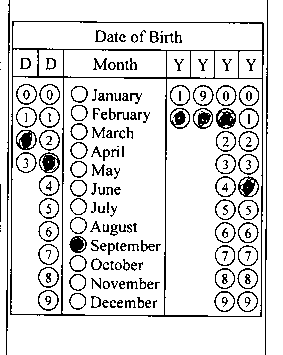
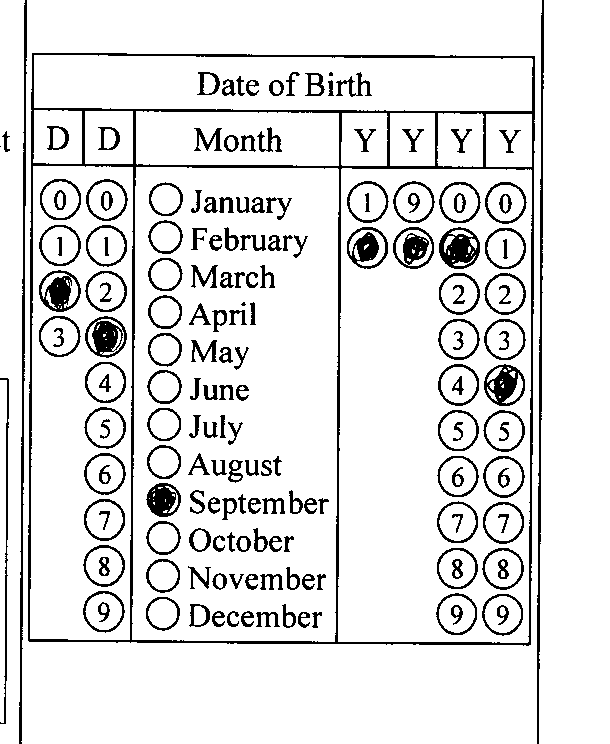
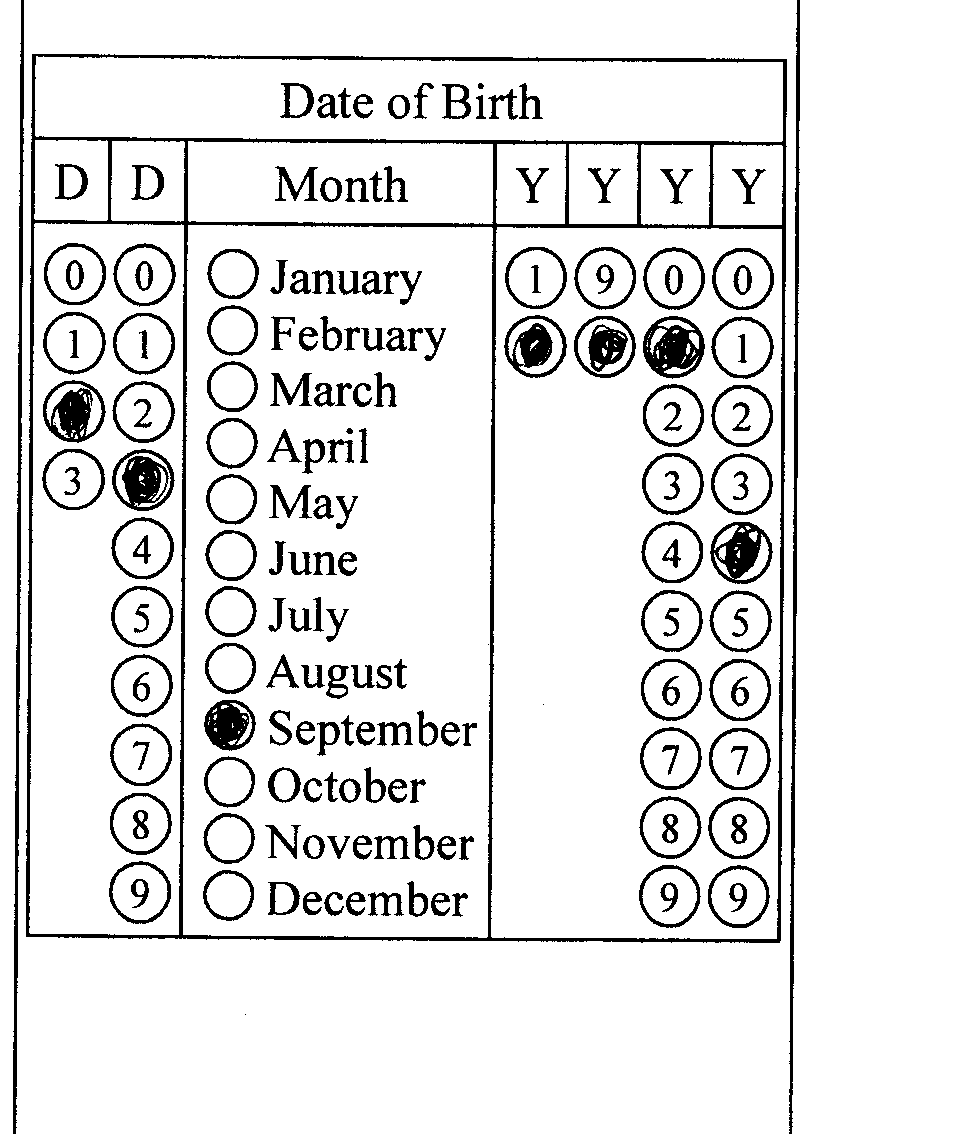
/// <summary>
/// Recognizes the birth date in filled OMR form.
/// </summary>
/// <param name="templateImagePath">A path to an image that represents a form template for filling the birth date.</param>
/// <param name="filledImagePath">A path to an image that represents filled form with the birth date.</param>
public static void RecognizeBirthDateInFilledOmrForm(string templateImagePath, string filledImagePath)
{
    // open an image that represents a form template for filling the birth date
    using (Vintasoft.Imaging.VintasoftImage templateImage = new Vintasoft.Imaging.VintasoftImage(templateImagePath))
    {
        // create a template manager
        Vintasoft.Imaging.FormsProcessing.FormRecognition.FormTemplateManager formTemplateManager =
            new Vintasoft.Imaging.FormsProcessing.FormRecognition.FormTemplateManager();
        // create a page template with birth date
        Vintasoft.Imaging.FormsProcessing.FormRecognition.FormPageTemplate formPageTemplate = CreatePageTemplateWithBirthDate();
        // add template image and page template to the template manager
        formTemplateManager.AddPageTemplate(templateImage, formPageTemplate);

        // open an image that represents filled form with the birth date
        using (Vintasoft.Imaging.VintasoftImage filledImage = new Vintasoft.Imaging.VintasoftImage(filledImagePath))
        {
            // recognize filled form with birth date
            RecognizeFilledFormInImage(formTemplateManager, filledImage);
        }
    }
}

/// <summary>
/// Recognizes filled form in an image.
/// </summary>
/// <param name="templateManager">The template manager that contains information about form template.</param>
/// <param name="image">An image that represents filled form.</param>
private static void RecognizeFilledFormInImage(
    Vintasoft.Imaging.FormsProcessing.FormRecognition.FormTemplateManager templateManager,
    Vintasoft.Imaging.VintasoftImage image)
{
    // create the template matching command
    Vintasoft.Imaging.FormsProcessing.TemplateMatching.TemplateMatchingCommand templateMatchingCommand =
        new Vintasoft.Imaging.FormsProcessing.TemplateMatching.TemplateMatchingCommand();
    // set the minimum confidence
    templateMatchingCommand.MinConfidence = 0.5f;
    // set template images
    templateMatchingCommand.TemplateImages = templateManager.TemplateImages;

    // create the form recognition manager
    Vintasoft.Imaging.FormsProcessing.FormRecognitionManager formRecognitionManager =
        new Vintasoft.Imaging.FormsProcessing.FormRecognitionManager(templateMatchingCommand, templateManager);

    // subscribe to the FormRecognitionResult.ImageRecognitionError event to output recognition errors
    formRecognitionManager.ImageRecognitionError += RecognitionManager_ImageRecognitionError;

    // recognize form in image
    Vintasoft.Imaging.FormsProcessing.FormRecognitionResult formRecognitionResult = formRecognitionManager.Recognize(image);

    // unsubscribe from FormRecognitionResult.ImageRecognitionError event
    formRecognitionManager.ImageRecognitionError -= RecognitionManager_ImageRecognitionError;

    // if recognition is failed
    if (formRecognitionResult == null)
        return;

    // get the result of image comparison
    Vintasoft.Imaging.FormsProcessing.TemplateMatching.ImageImprintCompareResult imageImprintCompareResult =
        formRecognitionResult.TemplateMatchingResult.ImageCompareResult;
    // if image comparison result is NOT reliable
    if (!imageImprintCompareResult.IsReliable)
    {
        // matching template is not found
        System.Console.WriteLine("Matching template is not found.");
    }
    // if image comparison result is reliable
    else
    {
        // get recognized form page
        Vintasoft.Imaging.FormsProcessing.FormRecognition.FormPage recognizedPage = formRecognitionResult.RecognizedPage;
        // write page info
        System.Console.WriteLine(string.Format(
            "Matching template: {0}; confidence: {1:F1}%.",
            recognizedPage.Name,
            imageImprintCompareResult.Confidence * 100));

        // get form field count
        if (recognizedPage.Items.Count == 0)
        {
            System.Console.WriteLine("No form fields were recognized.");
        }
        else
        {
            System.Console.WriteLine(string.Format(
                "Recognized form field count: {0}",
                recognizedPage.Items.Count));
            // for each recognized form field
            foreach (Vintasoft.Imaging.FormsProcessing.FormRecognition.FormField recognizedField in recognizedPage.Items)
            {
                // write field info to the console
                System.Console.WriteLine(string.Format(
                    "  Name: {0}; value: {1}; confidence: {2:F1}%",
                    recognizedField.Name,
                    recognizedField.Value,
                    recognizedField.Confidence * 100));
            }
        }
    }
}

/// <summary>
/// Handles the ImageRecognitionError event of the FormRecognitionManager.
/// </summary>
private static void RecognitionManager_ImageRecognitionError(
    object sender,
    Vintasoft.Imaging.FormsProcessing.FormRecognitionErrorEventArgs e)
{
    // writes information about form recognition error to the console
    System.Console.WriteLine(e.Exception.Message);
}