VintaSoft Imaging .NET SDK 15.1: Documentation for .NET developer
Vintasoft.Imaging.Pdf.Wpf.UI Namespace / WpfPdfCropSelectionTool Class
Members Object Syntax Remarks Hierarchy Requirements SeeAlso
In This Topic
WpfPdfCropSelectionTool Class
In This Topic
A visual tool for cropping of PDF page or image in image viewer.
Object Model
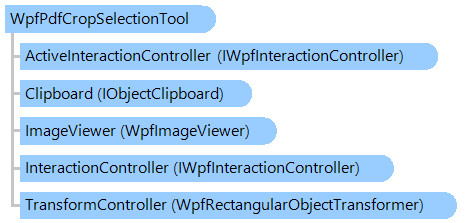
IWpfInteractionController IWpfInteractionController WpfRectangularObjectTransformer IObjectClipboard WpfImageViewer WpfPdfCropSelectionTool
Syntax
'Declaration

<DesignTimeVisibleAttribute("Visible = False")>
<ToolboxItemAttribute("ToolboxItemType = null", "ToolboxItemTypeName = ")>
<DefaultPropertyAttribute("Content")>
<ContentPropertyAttribute("Content")>
<LocalizabilityAttribute(None)>
<StyleTypedPropertyAttribute("Property = FocusVisualStyle", "StyleTargetType = System.Windows.Controls.Control")>
<XmlLangPropertyAttribute("Name = Language")>
<UsableDuringInitializationAttribute("Usable = True")>
<RuntimeNamePropertyAttribute("Name = Name")>
<UidPropertyAttribute()>
<TypeDescriptionProviderAttribute("TypeName = MS.Internal.ComponentModel.DependencyObjectProvider")>
<NameScopePropertyAttribute("Name = NameScope", "Type = System.Windows.NameScope")>
Public Class WpfPdfCropSelectionTool
   Inherits Vintasoft.Imaging.Wpf.UI.VisualTools.WpfCropSelectionTool

[DesignTimeVisible("Visible = False")]
[ToolboxItem("ToolboxItemType = null", "ToolboxItemTypeName = ")]
[DefaultProperty("Content")]
[ContentProperty("Content")]
[Localizability(None)]
[StyleTypedProperty("Property = FocusVisualStyle", "StyleTargetType = System.Windows.Controls.Control")]
[XmlLangProperty("Name = Language")]
[UsableDuringInitialization("Usable = True")]
[RuntimeNameProperty("Name = Name")]
[UidProperty()]
[TypeDescriptionProvider("TypeName = MS.Internal.ComponentModel.DependencyObjectProvider")]
[NameScopeProperty("Name = NameScope", "Type = System.Windows.NameScope")]
public class WpfPdfCropSelectionTool : Vintasoft.Imaging.Wpf.UI.VisualTools.WpfCropSelectionTool

Remarks

Rectangular region of PDF page or image in image viewer can be cropped as follows:

  • place the mouse to the desired position
  • press the action button (ActionButton) and select the "crop" region by holding the action button
  • press the action button inside the "crop" region for cropping of image; press any mouse button outside of the "crop" region for canceling cropping of image

Inheritance Hierarchy

System.Object
   System.Windows.Threading.DispatcherObject
      System.Windows.DependencyObject
         System.Windows.Media.Visual
            System.Windows.UIElement
               System.Windows.FrameworkElement
                  System.Windows.Controls.Control
                     System.Windows.Controls.ContentControl
                        Vintasoft.Imaging.Wpf.UI.VisualTools.WpfVisualTool
                           Vintasoft.Imaging.Wpf.UI.VisualTools.UserInteraction.WpfUserInteractionVisualTool
                              Vintasoft.Imaging.Wpf.UI.VisualTools.WpfRectangularSelectionTool
                                 Vintasoft.Imaging.Wpf.UI.VisualTools.WpfCropSelectionTool
                                    Vintasoft.Imaging.Pdf.Wpf.UI.WpfPdfCropSelectionTool

Requirements

Target Platforms: .NET 10; .NET 9; .NET 8; .NET 7; .NET 6; .NET Framework 4.8, 4.7, 4.6, 4.5, 4.0, 3.5

See Also