VintaSoft Imaging .NET SDK 15.1: Documentation for .NET developer
Vintasoft.Imaging.Wpf.UI.VisualTools Namespace / WpfRectangularSelectionTool Class
Members Object Syntax Remarks Hierarchy Requirements SeeAlso
In This Topic
WpfRectangularSelectionTool Class
In This Topic
Visual tool for selecting a rectangular image region in image viewer.
Object Model
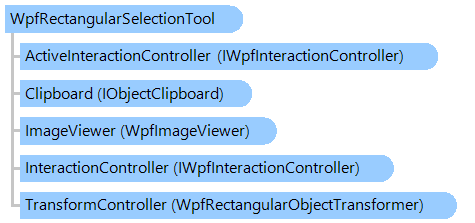
IWpfInteractionController IWpfInteractionController WpfRectangularObjectTransformer IObjectClipboard WpfImageViewer WpfRectangularSelectionTool
Syntax
'Declaration

<ToolboxItemAttribute("ToolboxItemType = null", "ToolboxItemTypeName = ")>
<DesignTimeVisibleAttribute("Visible = False")>
<DefaultPropertyAttribute("Content")>
<ContentPropertyAttribute("Content")>
<LocalizabilityAttribute(None)>
<StyleTypedPropertyAttribute("Property = FocusVisualStyle", "StyleTargetType = System.Windows.Controls.Control")>
<XmlLangPropertyAttribute("Name = Language")>
<UsableDuringInitializationAttribute("Usable = True")>
<RuntimeNamePropertyAttribute("Name = Name")>
<UidPropertyAttribute()>
<TypeDescriptionProviderAttribute("TypeName = MS.Internal.ComponentModel.DependencyObjectProvider")>
<NameScopePropertyAttribute("Name = NameScope", "Type = System.Windows.NameScope")>
Public Class WpfRectangularSelectionTool
   Inherits Vintasoft.Imaging.Wpf.UI.VisualTools.UserInteraction.WpfUserInteractionVisualTool
   Implements IWpfRectangularInteractiveObject, IWpfInteractiveObject

[ToolboxItem("ToolboxItemType = null", "ToolboxItemTypeName = ")]
[DesignTimeVisible("Visible = False")]
[DefaultProperty("Content")]
[ContentProperty("Content")]
[Localizability(None)]
[StyleTypedProperty("Property = FocusVisualStyle", "StyleTargetType = System.Windows.Controls.Control")]
[XmlLangProperty("Name = Language")]
[UsableDuringInitialization("Usable = True")]
[RuntimeNameProperty("Name = Name")]
[UidProperty()]
[TypeDescriptionProvider("TypeName = MS.Internal.ComponentModel.DependencyObjectProvider")]
[NameScopeProperty("Name = NameScope", "Type = System.Windows.NameScope")]
public class WpfRectangularSelectionTool : Vintasoft.Imaging.Wpf.UI.VisualTools.UserInteraction.WpfUserInteractionVisualTool, IWpfRectangularInteractiveObject, IWpfInteractiveObject

Remarks

Rectangular region of image in image viewer can be selected as follows:

  • place the mouse to the desired position
  • press the action button (ActionButton) and select the region by holding the action button
  • release the action button to stop the selection of region

Rectangular region of image in image viewer can be programmatically selected with Rectangle property.

Inheritance Hierarchy

System.Object
   System.Windows.Threading.DispatcherObject
      System.Windows.DependencyObject
         System.Windows.Media.Visual
            System.Windows.UIElement
               System.Windows.FrameworkElement
                  System.Windows.Controls.Control
                     System.Windows.Controls.ContentControl
                        Vintasoft.Imaging.Wpf.UI.VisualTools.WpfVisualTool
                           Vintasoft.Imaging.Wpf.UI.VisualTools.UserInteraction.WpfUserInteractionVisualTool
                              Vintasoft.Imaging.Wpf.UI.VisualTools.WpfRectangularSelectionTool
                                 Vintasoft.Imaging.Wpf.UI.VisualTools.WpfCropSelectionTool
                                 Vintasoft.Imaging.Wpf.UI.VisualTools.WpfDragDropSelectionTool
                                 Vintasoft.Imaging.Wpf.UI.VisualTools.WpfImageProcessingTool
                                 Vintasoft.Imaging.Wpf.UI.VisualTools.WpfOverlayImageTool
                                 Vintasoft.Imaging.Wpf.UI.VisualTools.WpfRectangularSelectionToolWithCopyPaste
                                 Vintasoft.Imaging.Wpf.UI.VisualTools.WpfZoomSelectionTool

Requirements

Target Platforms: .NET 10; .NET 9; .NET 8; .NET 7; .NET 6; .NET Framework 4.8, 4.7, 4.6, 4.5, 4.0, 3.5

See Also