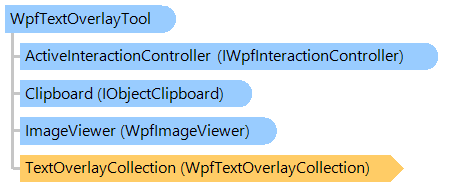
A visual tool for displaying static text graphic objects in an image viewer.
This C#/VB.NET code shows how to show the static text in image viewer.
''' <summary>
''' Shows the static text in image viewer.
''' </summary>
''' <param name="viewer">An image viewer.</param>
Public Shared Sub ShowStaticTextExample(viewer As Vintasoft.Imaging.Wpf.UI.WpfImageViewer)
' create the text overlay visual tool
Dim textOverlayTool As New Vintasoft.Imaging.Wpf.UI.VisualTools.WpfTextOverlayTool()
' text anchor
Dim textAnchor As Vintasoft.Imaging.AnchorType = Vintasoft.Imaging.AnchorType.Bottom Or Vintasoft.Imaging.AnchorType.Left Or Vintasoft.Imaging.AnchorType.Right Or Vintasoft.Imaging.AnchorType.Top
' create the text overlay object
Dim textOverlay As New Vintasoft.Imaging.Wpf.UI.VisualTools.WpfTextOverlay(textAnchor, "Text Overlay Example", New System.Windows.Media.Typeface("Arial"), 24, New System.Windows.Media.SolidColorBrush(System.Windows.Media.Color.FromArgb(255, 20, 200, 20)))
' add text overlay object to the text overlay collection of text overlay visual tool
textOverlayTool.TextOverlayCollection.Add(textOverlay)
' set visual tool as the active visual tool of image viewer
viewer.VisualTool = textOverlayTool
End Sub
/// <summary>
/// Shows the static text in image viewer.
/// </summary>
/// <param name="viewer">An image viewer.</param>
public static void ShowStaticTextExample(Vintasoft.Imaging.Wpf.UI.WpfImageViewer viewer)
{
// create the text overlay visual tool
Vintasoft.Imaging.Wpf.UI.VisualTools.WpfTextOverlayTool textOverlayTool =
new Vintasoft.Imaging.Wpf.UI.VisualTools.WpfTextOverlayTool();
// text anchor
Vintasoft.Imaging.AnchorType textAnchor =
Vintasoft.Imaging.AnchorType.Bottom |
Vintasoft.Imaging.AnchorType.Left |
Vintasoft.Imaging.AnchorType.Right |
Vintasoft.Imaging.AnchorType.Top;
// create the text overlay object
Vintasoft.Imaging.Wpf.UI.VisualTools.WpfTextOverlay textOverlay =
new Vintasoft.Imaging.Wpf.UI.VisualTools.WpfTextOverlay(
textAnchor,
"Text Overlay Example",
new System.Windows.Media.Typeface("Arial"),
24,
new System.Windows.Media.SolidColorBrush(System.Windows.Media.Color.FromArgb(255, 20, 200, 20)));
// add text overlay object to the text overlay collection of text overlay visual tool
textOverlayTool.TextOverlayCollection.Add(textOverlay);
// set visual tool as the active visual tool of image viewer
viewer.VisualTool = textOverlayTool;
}
System.Object
 System.Windows.Threading.DispatcherObject
   System.Windows.DependencyObject
     System.Windows.Media.Visual
       System.Windows.UIElement
         System.Windows.FrameworkElement
           System.Windows.Controls.Control
             System.Windows.Controls.ContentControl
               Vintasoft.Imaging.Wpf.UI.VisualTools.WpfVisualTool
                 Vintasoft.Imaging.Wpf.UI.VisualTools.UserInteraction.WpfUserInteractionVisualTool
                   Vintasoft.Imaging.Wpf.UI.VisualTools.GraphicObjects.WpfGraphicObjectTool
                     Vintasoft.Imaging.Wpf.UI.VisualTools.WpfTextOverlayTool
Target Platforms: .NET 10; .NET 9; .NET 8; .NET 7; .NET 6; .NET Framework 4.8, 4.7, 4.6, 4.5, 4.0, 3.5