VintaSoft Imaging .NET SDK 15.1: Documentation for .NET developer
Vintasoft.Imaging.Wpf.UI.VisualTools Namespace / WpfDragDropSelectionTool Class
Members Object Syntax Remarks Example Hierarchy Requirements SeeAlso
In This Topic
WpfDragDropSelectionTool Class
In This Topic
Visual tool for dragging and dropping a region of image in image viewer.
Object Model
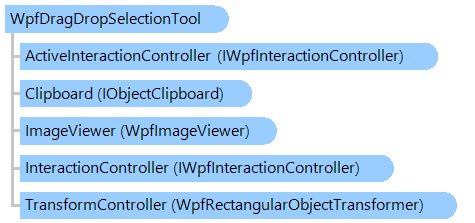
IWpfInteractionController IWpfInteractionController WpfRectangularObjectTransformer IObjectClipboard WpfImageViewer WpfDragDropSelectionTool
Syntax
'Declaration

<ToolboxItemAttribute("ToolboxItemType = null", "ToolboxItemTypeName = ")>
<DesignTimeVisibleAttribute("Visible = False")>
<DefaultPropertyAttribute("Content")>
<ContentPropertyAttribute("Content")>
<LocalizabilityAttribute(None)>
<StyleTypedPropertyAttribute("Property = FocusVisualStyle", "StyleTargetType = System.Windows.Controls.Control")>
<XmlLangPropertyAttribute("Name = Language")>
<UsableDuringInitializationAttribute("Usable = True")>
<RuntimeNamePropertyAttribute("Name = Name")>
<UidPropertyAttribute()>
<TypeDescriptionProviderAttribute("TypeName = MS.Internal.ComponentModel.DependencyObjectProvider")>
<NameScopePropertyAttribute("Name = NameScope", "Type = System.Windows.NameScope")>
Public NotInheritable Class WpfDragDropSelectionTool
   Inherits WpfRectangularSelectionTool

[ToolboxItem("ToolboxItemType = null", "ToolboxItemTypeName = ")]
[DesignTimeVisible("Visible = False")]
[DefaultProperty("Content")]
[ContentProperty("Content")]
[Localizability(None)]
[StyleTypedProperty("Property = FocusVisualStyle", "StyleTargetType = System.Windows.Controls.Control")]
[XmlLangProperty("Name = Language")]
[UsableDuringInitialization("Usable = True")]
[RuntimeNameProperty("Name = Name")]
[UidProperty()]
[TypeDescriptionProvider("TypeName = MS.Internal.ComponentModel.DependencyObjectProvider")]
[NameScopeProperty("Name = NameScope", "Type = System.Windows.NameScope")]
public sealed class WpfDragDropSelectionTool : WpfRectangularSelectionTool

Remarks

Rectangular region of image in image viewer can be drag-and-dropped as follows:

  • place the mouse on desired position
  • select the "drag" region using the action button (ActionButton)
  • press and hold the Drag button (DragButton) inside the "drag" region to start dragging; press any mouse button outside the "drag" region for canceling dragging of image region
  • pull the Drag button (DragButton) and drag the "drag" region
  • release the Drag button (DragButton) when "dragged" region is dragged to desired position
  • press the Drop button (DropButton) outside the "drag" region to drop the region; press any mouse button outside the "drag" region for canceling dropping of image region

The dragged region is not changed if CTRL key is pressed.

Example

This C#/VB.NET code shows how to programmatically drag and drop a region of image.


Class WpfDragDropSelectionToolExample
    ' Programmatically drag and drop a region of image.
    Public Sub ProgrammaticallyDragAndDropImageInViewer(viewer As Vintasoft.Imaging.Wpf.UI.WpfImageViewer)
        ' create an instance of the DragDropSelectionTool class
        Dim dragDropSelectionTool As New Vintasoft.Imaging.Wpf.UI.VisualTools.WpfDragDropSelectionTool()
        ' set the tool as the current tool of the ImageViewer
        viewer.VisualTool = dragDropSelectionTool
        ' set the region of interest on image
        dragDropSelectionTool.Rectangle = New System.Windows.Rect(50, 50, 250, 150)
        ' drag and drop the selected region of image to the specified location within the image
        dragDropSelectionTool.DragAndDrop(New System.Windows.Point(200, 250))
    End Sub
End Class


class WpfDragDropSelectionToolExample
{
    // Programmatically drag and drop a region of image.
    public void ProgrammaticallyDragAndDropImageInViewer(Vintasoft.Imaging.Wpf.UI.WpfImageViewer viewer)
    {
        // create an instance of the DragDropSelectionTool class
        Vintasoft.Imaging.Wpf.UI.VisualTools.WpfDragDropSelectionTool dragDropSelectionTool =
            new Vintasoft.Imaging.Wpf.UI.VisualTools.WpfDragDropSelectionTool();
        // set the tool as the current tool of the ImageViewer
        viewer.VisualTool = dragDropSelectionTool;
        // set the region of interest on image
        dragDropSelectionTool.Rectangle = new System.Windows.Rect(50, 50, 250, 150);
        // drag and drop the selected region of image to the specified location within the image
        dragDropSelectionTool.DragAndDrop(new System.Windows.Point(200, 250));
    }
}

Inheritance Hierarchy

System.Object
   System.Windows.Threading.DispatcherObject
      System.Windows.DependencyObject
         System.Windows.Media.Visual
            System.Windows.UIElement
               System.Windows.FrameworkElement
                  System.Windows.Controls.Control
                     System.Windows.Controls.ContentControl
                        Vintasoft.Imaging.Wpf.UI.VisualTools.WpfVisualTool
                           Vintasoft.Imaging.Wpf.UI.VisualTools.UserInteraction.WpfUserInteractionVisualTool
                              Vintasoft.Imaging.Wpf.UI.VisualTools.WpfRectangularSelectionTool
                                 Vintasoft.Imaging.Wpf.UI.VisualTools.WpfDragDropSelectionTool

Requirements

Target Platforms: .NET 10; .NET 9; .NET 8; .NET 7; .NET 6; .NET Framework 4.8, 4.7, 4.6, 4.5, 4.0, 3.5

See Also