PdfInteractiveFormPushButtonField Class
In This Topic
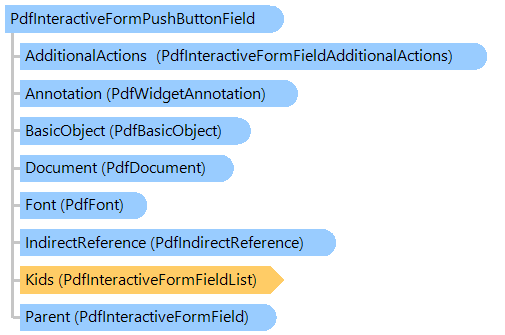
Provides information about interactive form field that defines push button.
Object Model
Syntax
Example
Here is an example that shows how to create a PDF document with the push button field:
Class PdfInteractiveFormPushbuttonFieldExample
    ''' <summary>
    ''' Creates a PDF document with push button field.
    ''' </summary>
    ''' <param name="filename">The filename.</param>
    Public Shared Sub CreateDocumentWithPushbuttonField(filename As String)
        ' create PDF document
        Using document As New Vintasoft.Imaging.Pdf.PdfDocument()
            ' create interactive form in PDF document
            document.InteractiveForm = New Vintasoft.Imaging.Pdf.Tree.InteractiveForms.PdfDocumentInteractiveForm(document)

            ' specify that the viewer application must construct appearance streams and
            ' appearance properties for all widget annotations
            document.InteractiveForm.NeedAppearances = True

            ' create an empty page
            Dim page As New Vintasoft.Imaging.Pdf.Tree.PdfPage(document, Vintasoft.Imaging.PaperSizeKind.A4)
            ' add page to the document
            document.Pages.Add(page)

            Dim width As Single = 70
            Dim height As Single = 30
            ' create a rectangle that defines push box position on PDF page
            Dim rect As New System.Drawing.RectangleF((page.Size.Width - width) / 2, ((page.Size.Height - height) / 3) * 2, width, height)

            ' create a push button field
            Dim button As New Vintasoft.Imaging.Pdf.Tree.InteractiveForms.PdfInteractiveFormPushButtonField(document, "BestFitButton", rect)

            ' set the border style
            button.Annotation.BorderStyle = New Vintasoft.Imaging.Pdf.Tree.Annotations.PdfAnnotationBorderStyle(document)
            button.Annotation.BorderStyle.Style = Vintasoft.Imaging.Pdf.Tree.Annotations.PdfAnnotationBorderStyleType.Beveled
            button.Annotation.BorderStyle.Width = 1

            ' set the appearance characteristics
            button.Annotation.AppearanceCharacteristics = New Vintasoft.Imaging.Pdf.Tree.Annotations.PdfAnnotationAppearanceCharacteristics(document)
            button.Annotation.AppearanceCharacteristics.BackgroundColor = System.Drawing.Color.LightGray
            button.Annotation.AppearanceCharacteristics.ButtonNormalCaption = "BestFit"

            ' set the activate action
            button.Annotation.ActivateAction = New Vintasoft.Imaging.Pdf.Tree.PdfGotoAction(New Vintasoft.Imaging.Pdf.Tree.PdfDestinationFit(document, page))

            ' set the default appearance of text
            Dim font As Vintasoft.Imaging.Pdf.Tree.Fonts.PdfFont = document.FontManager.GetStandardFont(Vintasoft.Imaging.Pdf.Tree.Fonts.PdfStandardFontType.TimesRoman)
            button.SetTextDefaultAppearance(font, 12, System.Drawing.Color.Black)

            ' add the push button field to the interactive form of document
            document.InteractiveForm.Fields.Add(button)

            ' add annotation, associated with push button field, to the page
            page.Annotations = New Vintasoft.Imaging.Pdf.Tree.Annotations.PdfAnnotationList(document)
            page.Annotations.Add(button.Annotation)

            ' save the document
            document.Save(filename)
        End Using
    End Sub
End Class
class PdfInteractiveFormPushbuttonFieldExample
{
    /// <summary>
    /// Creates a PDF document with push button field.
    /// </summary>
    /// <param name="filename">The filename.</param>
    public static void CreateDocumentWithPushbuttonField(string filename)
    {
        // create PDF document
        using (Vintasoft.Imaging.Pdf.PdfDocument document = new Vintasoft.Imaging.Pdf.PdfDocument())
        {
            // create interactive form in PDF document
            document.InteractiveForm =
                new Vintasoft.Imaging.Pdf.Tree.InteractiveForms.PdfDocumentInteractiveForm(document);

            // specify that the viewer application must construct appearance streams and
            // appearance properties for all widget annotations
            document.InteractiveForm.NeedAppearances = true;

            // create an empty page
            Vintasoft.Imaging.Pdf.Tree.PdfPage page = new Vintasoft.Imaging.Pdf.Tree.PdfPage(
                document, Vintasoft.Imaging.PaperSizeKind.A4);
            // add page to the document
            document.Pages.Add(page);

            float width = 70;
            float height = 30;
            // create a rectangle that defines push box position on PDF page
            System.Drawing.RectangleF rect = new System.Drawing.RectangleF(
                (page.Size.Width - width) / 2,
                ((page.Size.Height - height) / 3) * 2,
                width, height);

            // create a push button field
            Vintasoft.Imaging.Pdf.Tree.InteractiveForms.PdfInteractiveFormPushButtonField button =
                new Vintasoft.Imaging.Pdf.Tree.InteractiveForms.PdfInteractiveFormPushButtonField(
                    document, "BestFitButton", rect);

            // set the border style
            button.Annotation.BorderStyle =
                new Vintasoft.Imaging.Pdf.Tree.Annotations.PdfAnnotationBorderStyle(document);
            button.Annotation.BorderStyle.Style =
                Vintasoft.Imaging.Pdf.Tree.Annotations.PdfAnnotationBorderStyleType.Beveled;
            button.Annotation.BorderStyle.Width = 1;

            // set the appearance characteristics
            button.Annotation.AppearanceCharacteristics =
                new Vintasoft.Imaging.Pdf.Tree.Annotations.PdfAnnotationAppearanceCharacteristics(document);
            button.Annotation.AppearanceCharacteristics.BackgroundColor = System.Drawing.Color.LightGray;
            button.Annotation.AppearanceCharacteristics.ButtonNormalCaption = "BestFit";

            // set the activate action
            button.Annotation.ActivateAction = new Vintasoft.Imaging.Pdf.Tree.PdfGotoAction(
                new Vintasoft.Imaging.Pdf.Tree.PdfDestinationFit(document, page));

            // set the default appearance of text
            Vintasoft.Imaging.Pdf.Tree.Fonts.PdfFont font = document.FontManager.GetStandardFont(
                Vintasoft.Imaging.Pdf.Tree.Fonts.PdfStandardFontType.TimesRoman);
            button.SetTextDefaultAppearance(font, 12, System.Drawing.Color.Black);

            // add the push button field to the interactive form of document
            document.InteractiveForm.Fields.Add(button);

            // add annotation, associated with push button field, to the page
            page.Annotations = new Vintasoft.Imaging.Pdf.Tree.Annotations.PdfAnnotationList(document);
            page.Annotations.Add(button.Annotation);

            // save the document
            document.Save(filename);
        }
    }
}
Inheritance Hierarchy
Requirements
Target Platforms: .NET 10; .NET 9; .NET 8; .NET 7; .NET 6; .NET Framework 4.8, 4.7, 4.6, 4.5, 4.0, 3.5
See Also