Generieren eines Azteken-Barcodes der erforderlichen Form in .NET
Blog-Kategorie: Barcode ; .NET
03.06.2020

/// <summary>
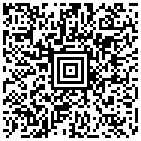
/// Generates Aztec barcode as raster image.
/// </summary>
public void GenerateAztecBarcode()
{
    // create the barcode writer
    Vintasoft.Barcode.BarcodeWriter barcodeWriter = new Vintasoft.Barcode.BarcodeWriter();

    // set barcode writer settings
    barcodeWriter.Settings.Barcode = Vintasoft.Barcode.BarcodeType.Aztec;
    barcodeWriter.Settings.Value = "VintaSoft Barcode .NET SDK is the professional 1D & 2D barcode reader and barcode generator library for .NET, WPF and WEB.";

    // get barcode as image
    using (System.Drawing.Image barcodeImage = barcodeWriter.GetBarcodeAsBitmap())
    {
        // save the barcode image to a file
        barcodeImage.Save("aztec-barcode.png");
    }
}
/// <summary>
/// Recognizes Aztec barcode in image.
/// </summary>
/// <param name="barcodeImageFilePath">A path to a barcode image file.</param>
public void RecognizeAztecBarcode()
{
    // create barcode reader
    using (Vintasoft.Barcode.BarcodeReader reader = new Vintasoft.Barcode.BarcodeReader())
    {
        // specify that reader must search for Aztec barcodes
        reader.Settings.ScanBarcodeTypes = Vintasoft.Barcode.BarcodeType.Aztec;

        // specify that reader must search for horizontal barcodes only
        reader.Settings.ScanDirection = Vintasoft.Barcode.ScanDirection.Horizontal;

        // read barcodes from image file
        Vintasoft.Barcode.IBarcodeInfo[] barcodeInfos = reader.ReadBarcodes("aztec-barcode.png");

        // if barcodes are not detected
        if (barcodeInfos.Length == 0)
        {
            System.Console.WriteLine("Barcodes are not found.");
        }
        // if barcodes are detected
        else
        {
            // get information about recognized barcodes

            System.Console.WriteLine(string.Format("{0} barcode(s) found:", barcodeInfos.Length));
            System.Console.WriteLine();
            for (int i = 0; i < barcodeInfos.Length; i++)
            {
                Vintasoft.Barcode.IBarcodeInfo barcodeInfo = barcodeInfos[i];
                System.Console.WriteLine(string.Format("[{0}:{1}]", i + 1, barcodeInfo.BarcodeType));
                System.Console.WriteLine(string.Format("Value:      {0}", barcodeInfo.Value));
                System.Console.WriteLine(string.Format("Region:     {0}", barcodeInfo.Region));
                System.Console.WriteLine();
            }
        }
    }
}
1 barcode(s) found:

[1:Aztec]
Value: VintaSoft Barcode .NET SDK is the professional 1D & 2D barcode reader and barcode generator library for .NET, WPF and WEB.
/// <summary>
/// Generates several Aztec barcodes with structure append information and aligns barcodes horizontally.
/// </summary>
public void GenerateAztecBarcodesWithStructureAppendAndAlignBarcodeHorizontally()
{
    // source text
    string text = "VintaSoft Barcode .NET SDK is the professional 1D & 2D barcode reader and barcode generator library for .NET, WPF and WEB.";

    // count of text blocks
    int textBlockCount = 4;

    // maximum length of text block
    int textBlockLen = text.Length / textBlockCount;
    if ((text.Length % textBlockCount) != 0)
        textBlockLen++;

    // array with barcode images
    System.Drawing.Image[] barcodeImages = new System.Drawing.Image[textBlockCount];
    // for each text block
    for (int i = 0; i < textBlockCount; i++)
    {
        // calculate text block string

        string textBlock = text.Substring(0, textBlockLen);
        text = text.Substring(textBlockLen);

        // generate barcode image with text block
        barcodeImages[i] = GenerateImageOfAztecBarcodeWithStructureAppendInformation(textBlock, i + 1, textBlockCount);
    }

    // width of image with merged barcodes
    int mergedBarcodeWidth = 0;
    // for each barcode image
    for (int i = 0; i < barcodeImages.Length; i++)
    {
        // increase width of image with merged barcodes
        mergedBarcodeWidth += barcodeImages[i].Width;
    }

    // calculate height of image with merged barcodes
    int mergedBarcodeHeight = barcodeImages[0].Height;

    // create image with merged barcodes
    using (System.Drawing.Image mergedBarcodesImage = new System.Drawing.Bitmap(mergedBarcodeWidth, mergedBarcodeHeight))
    {
        // create Graphics for drawing on image with merged barcodes
        using (System.Drawing.Graphics g = System.Drawing.Graphics.FromImage(mergedBarcodesImage))
        {
            // fill image with merged barcodes using white color
            g.FillRectangle(System.Drawing.Brushes.White, new System.Drawing.RectangleF(0, 0, mergedBarcodesImage.Width, mergedBarcodesImage.Height));

            // the horizontal position of barcode image on image with merged barcodes
            int barcodeXPosition = 0;
            // for each barcode image
            for (int i = 0; i < barcodeImages.Length; i++)
            {
                // draw barcode image on image with merged barcodes
                g.DrawImage(barcodeImages[i], new System.Drawing.PointF(barcodeXPosition, 0));

                // change the horizontal position of barcode image on image with merged barcodes
                barcodeXPosition += barcodeImages[i].Width;
            }
        }

        // save image with merged barcodes to a file
        mergedBarcodesImage.Save("aztec-barcodes-with-structure-append-and-aligned-horizontally.png");
    }

    // for each barcode image
    for (int i = 0; i < barcodeImages.Length; i++)
    {
        // dispose barcode image
        barcodeImages[i].Dispose();
    }
}

/// <summary>
/// Generates an image of Aztec barcode, which contains information about the structure append.
/// </summary>
/// <param name="barcodeValue">Barcode value.</param>
/// <param name="symbolPosition">Value position in structure append. Value from 1 to <i>symbolCount</i>.</param>
/// <param name="symbolCount">Count of values in structure append.</param>
/// <returns>An image of Aztec barcode, which contains information about the structure append.</returns>
public System.Drawing.Image GenerateImageOfAztecBarcodeWithStructureAppendInformation(string barcodeValue, int symbolPosition, int symbolCount)
{
    // create the barcode writer
    Vintasoft.Barcode.BarcodeWriter barcodeWriter = new Vintasoft.Barcode.BarcodeWriter();

    // specify that Aztec barcode must be created
    barcodeWriter.Settings.Barcode = Vintasoft.Barcode.BarcodeType.Aztec;

    // specify that created Aztec barcode should not have padding
    barcodeWriter.Settings.Padding = 0;

    // specify the barcode values
    barcodeWriter.Settings.ValueItems = new Vintasoft.Barcode.BarcodeInfo.ValueItemBase[] {
        // create the non-data flag that contains information about structure append
        Vintasoft.Barcode.BarcodeInfo.NonDataFlags.CreateAztecStructuredAppendCharacter(symbolPosition, symbolCount, null),
        // create a text value item
        new Vintasoft.Barcode.BarcodeInfo.TextValueItem(barcodeValue)
    };

    // return generated barcode image
    return barcodeWriter.GetBarcodeAsBitmap();
}

/// <summary>
/// Recognizes Aztec barcodes with structure append information.
/// </summary>
/// <param name="barcodeImageFilePath">A path to a barcode image file.</param>
public void RecognizeAztecBarcodesWithStructureAppend()
{
    // create barcode reader
    using (Vintasoft.Barcode.BarcodeReader reader = new Vintasoft.Barcode.BarcodeReader())
    {
        // specify that reader must search for Aztec barcodes
        reader.Settings.ScanBarcodeTypes = Vintasoft.Barcode.BarcodeType.Aztec;

        // specify that reader must search for horizontal barcodes only
        reader.Settings.ScanDirection = Vintasoft.Barcode.ScanDirection.Horizontal;

        // read barcodes from image file
        Vintasoft.Barcode.IBarcodeInfo[] barcodeInfos = reader.ReadBarcodes("aztec-barcodes-with-structure-append-and-aligned-horizontally.png");

        // if barcodes are not detected
        if (barcodeInfos.Length == 0)
        {
            System.Console.WriteLine("Barcodes are not found.");
        }
        // if barcodes are detected
        else
        {
            // reconstruct barcode info from barcode infos with structure append information
            Vintasoft.Barcode.BarcodeInfo.StructuredAppendBarcodeInfo[] reconstructedBarcodeInfos =
                Vintasoft.Barcode.BarcodeInfo.StructuredAppendBarcodeInfo.ReconstructFrom(barcodeInfos);

            // get information about recognized barcodes

            System.Console.WriteLine(string.Format("{0} reconstructed barcode(s) found:", reconstructedBarcodeInfos.Length));
            System.Console.WriteLine();
            for (int i = 0; i < reconstructedBarcodeInfos.Length; i++)
            {
                Vintasoft.Barcode.BarcodeInfo.StructuredAppendBarcodeInfo reconstructedBarcodeInfo = reconstructedBarcodeInfos[i];
                System.Console.WriteLine(string.Format("[{0}:{1}]", i + 1, reconstructedBarcodeInfo.BarcodeType));
                System.Console.WriteLine(string.Format("Value:      {0}", reconstructedBarcodeInfo.Value));
                System.Console.WriteLine();
            }
        }
    }
}
1 reconstructed barcode(s) found:

[1:Aztec]
Value: VintaSoft Barcode .NET SDK is the professional 1D & 2D barcode reader and barcode generator library for .NET, WPF and WEB.