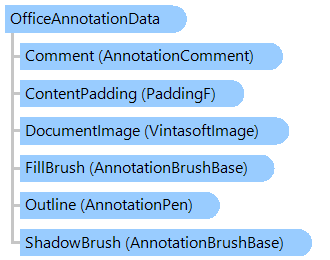
OfficeAnnotationData Class
In This Topic
Contains information about the annotation that displays a DOCX document.
Object Model
Syntax
'Declaration

<SerializableAttribute()>
Public Class OfficeAnnotationData
   Inherits Vintasoft.Imaging.Annotation.RectangleAnnotationData
[Serializable()]
public class OfficeAnnotationData : Vintasoft.Imaging.Annotation.RectangleAnnotationData
[Serializable()]
public __gc class OfficeAnnotationData : public Vintasoft.Imaging.Annotation.RectangleAnnotationData*
[Serializable()]
public ref class OfficeAnnotationData : public Vintasoft.Imaging.Annotation.RectangleAnnotationData^
Example
Here is an example that shows how to add annotation with diagramm to a TIFF image (example uses template document ChartTemplate.docx):
''' <summary>
''' Add Office annotation to a TIFF file.
''' </summary>
''' <param name="filePath">The TIFF file path.</param>
''' <param name="annotationRectInDip">The annotation area on TIFF image, in DIP.</param>
Public Shared Sub AnnotateTiffImageUsingOfficeAnnotation(filePath As String, annotationRectInDip As System.Drawing.RectangleF)
    ' if file does not exist
    If Not System.IO.File.Exists(filePath) Then
        Throw New System.IO.FileNotFoundException()
    End If

    ' path to a template DOCX document with chart
    Dim templateDocDocumentPath As String = "ChartTemplate.docx"

    ' open template DOCX document with chart
    Using sourceFileStream As System.IO.Stream = System.IO.File.Open(templateDocDocumentPath, System.IO.FileMode.Open, System.IO.FileAccess.ReadWrite)
        ' create Office annotation data, which is based on template DOCX document with chart
        Using annotationData As New Vintasoft.Imaging.Annotation.Office.OfficeAnnotationData(sourceFileStream)
            ' update annotation properties

            annotationData.Location = annotationRectInDip.Location + New System.Drawing.SizeF(annotationRectInDip.Width / 2F, annotationRectInDip.Height / 2F)
            annotationData.Size = annotationRectInDip.Size
            annotationData.UseGraphicObjectRelativeSize = True

            ' fill the document template with real data
            FillDocumentTemplate(annotationData)

            ' create image collection
            Using imageCollection As New Vintasoft.Imaging.ImageCollection()
                ' open TIFF file
                imageCollection.Add(filePath, False)
                Try
                    ' create annotation data controller for image collection
                    Using annotationDataController As New Vintasoft.Imaging.Annotation.AnnotationDataController(imageCollection)
                        ' add Office annotation to the first image in TIFF file
                        annotationDataController(0).Add(annotationData)

                        ' create TIFF encoder
                        Dim tiffEncoder As New Vintasoft.Imaging.Codecs.Encoders.TiffEncoder()
                        tiffEncoder.SaveAndSwitchSource = True

                        ' save image with annotation
                        imageCollection.SaveSync(filePath, tiffEncoder)
                    End Using
                Finally
                    ' close TIFF file
                    imageCollection.ClearAndDisposeItems()
                End Try
            End Using
        End Using
    End Using
End Sub

''' <summary>
''' Fills the template DOCX document with real data.
''' </summary>
''' <param name="annotationData">The Office annotation data.</param>
Private Shared Sub FillDocumentTemplate(annotationData As Vintasoft.Imaging.Annotation.Office.OfficeAnnotationData)
    ' create DOCX document editor
    Using editor As New Vintasoft.Imaging.Office.OpenXml.Editor.Docx.DocxDocumentEditor(annotationData.DocumentStream)
        ' get DOCX document body
        Dim documentBody As Vintasoft.Imaging.Office.OpenXml.Editor.OpenXmlDocumentElement = editor.Body

        ' change TITLE

        ' find title
        Dim titleText As Vintasoft.Imaging.Office.OpenXml.Editor.OpenXmlTextContent = documentBody.FindText("[TITLE]")
        ' change the title text
        titleText.Text = "Sales"
        ' highlight the title in bold
        titleText.SetTextProperties(Vintasoft.Imaging.Office.OpenXml.Editor.OpenXmlTextProperties.BoldText)


        ' change DATE

        ' find date
        Dim dateText As Vintasoft.Imaging.Office.OpenXml.Editor.OpenXmlTextContent = documentBody.FindText("[DATE]")
        ' change the date text
        dateText.Text = System.DateTime.Now.ToString("yyyy")

        ' create the date text properties
        Dim dateTextProperties As New Vintasoft.Imaging.Office.OpenXml.Editor.OpenXmlTextProperties()
        ' change the date text color
        dateTextProperties.Color = System.Drawing.Color.Blue
        ' change the date text size
        dateTextProperties.FontSize = 24

        ' change the date text properties
        dateText.SetTextProperties(dateTextProperties)


        ' change CHART

        ' create the chart data
        Dim chartData As System.Nullable(Of Double)(,) = New System.Nullable(Of Double)(,) {{55, 32, 23}, {84, 48, 33}, {72, 53, 86}, {34, 82, 11}}
        ' change the chart data
        editor.Charts(0).ChartData.SetData(chartData)


        ' create stream for changed document (disposed after use)
        Dim changedDocumentStream As New System.IO.MemoryStream()
        ' save template changes
        editor.Save(changedDocumentStream)
        ' change document stream
        annotationData.SetDocumentStream(changedDocumentStream, True)
    End Using
End Sub
/// <summary>
/// Add Office annotation to a TIFF file.
/// </summary>
/// <param name="filePath">The TIFF file path.</param>
/// <param name="annotationRectInDip">The annotation area on TIFF image, in DIP.</param>
public static void AnnotateTiffImageUsingOfficeAnnotation(string filePath, System.Drawing.RectangleF annotationRectInDip)
{
    // if file does not exist
    if (!System.IO.File.Exists(filePath))
        throw new System.IO.FileNotFoundException();

    // path to a template DOCX document with chart
    string templateDocDocumentPath = "ChartTemplate.docx";

    // open template DOCX document with chart
    using (System.IO.Stream sourceFileStream = System.IO.File.Open(
        templateDocDocumentPath, System.IO.FileMode.Open, System.IO.FileAccess.ReadWrite))
    {
        // create Office annotation data, which is based on template DOCX document with chart
        using (Vintasoft.Imaging.Annotation.Office.OfficeAnnotationData annotationData =
            new Vintasoft.Imaging.Annotation.Office.OfficeAnnotationData(sourceFileStream))
        {
            // update annotation properties

            annotationData.Location = annotationRectInDip.Location + new System.Drawing.SizeF(
                annotationRectInDip.Width / 2f,
                annotationRectInDip.Height / 2f);
            annotationData.Size = annotationRectInDip.Size;
            annotationData.UseGraphicObjectRelativeSize = true;

            // fill the document template with real data
            FillDocumentTemplate(annotationData);

            // create image collection
            using (Vintasoft.Imaging.ImageCollection imageCollection = new Vintasoft.Imaging.ImageCollection())
            {
                // open TIFF file
                imageCollection.Add(filePath, false);
                try
                {
                    // create annotation data controller for image collection
                    using (Vintasoft.Imaging.Annotation.AnnotationDataController annotationDataController =
                        new Vintasoft.Imaging.Annotation.AnnotationDataController(imageCollection))
                    {
                        // add Office annotation to the first image in TIFF file
                        annotationDataController[0].Add(annotationData);

                        // create TIFF encoder
                        Vintasoft.Imaging.Codecs.Encoders.TiffEncoder tiffEncoder =
                            new Vintasoft.Imaging.Codecs.Encoders.TiffEncoder();
                        tiffEncoder.SaveAndSwitchSource = true;

                        // save image with annotation
                        imageCollection.SaveSync(filePath, tiffEncoder);
                    }
                }
                finally
                {
                    // close TIFF file
                    imageCollection.ClearAndDisposeItems();
                }
            }
        }
    }
}

/// <summary>
/// Fills the template DOCX document with real data.
/// </summary>
/// <param name="annotationData">The Office annotation data.</param>
private static void FillDocumentTemplate(Vintasoft.Imaging.Annotation.Office.OfficeAnnotationData annotationData)
{
    // create DOCX document editor
    using (Vintasoft.Imaging.Office.OpenXml.Editor.Docx.DocxDocumentEditor editor =
        new Vintasoft.Imaging.Office.OpenXml.Editor.Docx.DocxDocumentEditor(annotationData.DocumentStream))
    {
        // get DOCX document body
        Vintasoft.Imaging.Office.OpenXml.Editor.OpenXmlDocumentElement documentBody = editor.Body;

        // change TITLE

        // find title
        Vintasoft.Imaging.Office.OpenXml.Editor.OpenXmlTextContent titleText = documentBody.FindText("[TITLE]");
        // change the title text
        titleText.Text = "Sales";
        // highlight the title in bold
        titleText.SetTextProperties(Vintasoft.Imaging.Office.OpenXml.Editor.OpenXmlTextProperties.BoldText);


        // change DATE

        // find date
        Vintasoft.Imaging.Office.OpenXml.Editor.OpenXmlTextContent dateText = documentBody.FindText("[DATE]");
        // change the date text
        dateText.Text = System.DateTime.Now.ToString("yyyy");

        // create the date text properties
        Vintasoft.Imaging.Office.OpenXml.Editor.OpenXmlTextProperties dateTextProperties =
            new Vintasoft.Imaging.Office.OpenXml.Editor.OpenXmlTextProperties();
        // change the date text color
        dateTextProperties.Color = System.Drawing.Color.Blue;
        // change the date text size
        dateTextProperties.FontSize = 24;

        // change the date text properties
        dateText.SetTextProperties(dateTextProperties);


        // change CHART

        // create the chart data
        double?[,] chartData = new double?[,] {
             { 55, 32, 23 },
             { 84, 48, 33 },
             { 72, 53, 86 },
             { 34, 82, 11 } };
        // change the chart data
        editor.Charts[0].ChartData.SetData(chartData);


        // create stream for changed document (disposed after use)
        System.IO.MemoryStream changedDocumentStream = new System.IO.MemoryStream();
        // save template changes
        editor.Save(changedDocumentStream);
        // change document stream
        annotationData.SetDocumentStream(changedDocumentStream, true);
    }
}
Inheritance Hierarchy
System.Object
Vintasoft.Imaging.Annotation.AnnotationData
Vintasoft.Imaging.Annotation.TextAnnotationDataBase
Vintasoft.Imaging.Annotation.RectangleAnnotationData
Vintasoft.Imaging.Annotation.Office.OfficeAnnotationData
Requirements
Target Platforms: .NET 10; .NET 9; .NET 8; .NET 7; .NET 6; .NET Framework 4.8, 4.7, 4.6, 4.5, 4.0, 3.5
See Also
Reference
OfficeAnnotationData Members
Vintasoft.Imaging.Annotation.Office Namespace
DocumentStream
ContentScale
ContentPadding