VintaSoft Imaging .NET SDK 15.1: Documentation for .NET developer
Vintasoft.Imaging.Dicom.Mpr.UI.VisualTools Namespace / MprImageTool Class
Members Object Syntax Remarks Example Hierarchy Requirements SeeAlso
In This Topic
MprImageTool Class
In This Topic
Represents a visual tool, which allows to
  1. view DICOM MPR slice in WinForms image viewer
  2. move DICOM MPR slice along the horizontal, vertical and perpendicular axis in WinForms image viewer
  3. rotate DICOM MPR slice in 2D and 3D space in WinForms image viewer
  4. build new DICOM MPR slice in image viewer.
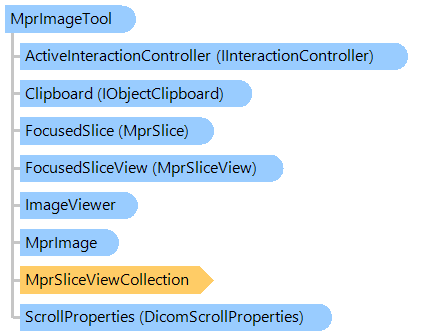
Object Model
DicomScroll MprSliceViewCollection MprImage DicomScrollProperties MprSlice MprSliceView IObjectClipboard IInteractionController ImageViewer MprImageTool
Syntax
Remarks

By default this visual tool uses the left mouse button for browsing of DICOM MPR slices (moving of DICOM MPR slice along the perpendicular axis) and uses the right mouse button for panning of DICOM MPR slice (moving of DICOM MPR slice along the horizontal and vertical axis).

Example

This C#/VB.NET code shows how to display an axial DICOM MPR slice in image viewer.


''' <summary>
''' Displays the axial slice in viewer.
''' </summary>
''' <param name="viewer">The image viewer.</param>
''' <param name="mprImage">The MPR image.</param>
Public Shared Sub DisplayAxialSliceInViewer(viewer As Vintasoft.Imaging.UI.ImageViewer, mprImage As Vintasoft.Imaging.Dicom.Mpr.MprImage)
    ' create the MPR visualization controller
    Dim controller As New Vintasoft.Imaging.Dicom.Mpr.UI.MprVisualizationController(mprImage, viewer)

    ' create the axial slice
    Dim axialSlice As Vintasoft.Imaging.Dicom.Mpr.MprPlanarSlice = mprImage.CreateAxialSlice(mprImage.YLength / 2.0)

    ' add slice to the MPR visualization controller
    controller.AddSliceVisualization(axialSlice, System.Drawing.Color.Yellow)

    ' specify that the slice must be shown in viewer
    controller.ShowSliceInViewer(viewer, axialSlice)
End Sub


/// <summary>
/// Displays the axial slice in viewer.
/// </summary>
/// <param name="viewer">The image viewer.</param>
/// <param name="mprImage">The MPR image.</param>
public static void DisplayAxialSliceInViewer(
    Vintasoft.Imaging.UI.ImageViewer viewer, 
    Vintasoft.Imaging.Dicom.Mpr.MprImage mprImage)
{            
    // create the MPR visualization controller
    Vintasoft.Imaging.Dicom.Mpr.UI.MprVisualizationController controller =
        new Vintasoft.Imaging.Dicom.Mpr.UI.MprVisualizationController(mprImage, viewer);

    // create the axial slice
    Vintasoft.Imaging.Dicom.Mpr.MprPlanarSlice axialSlice = 
        mprImage.CreateAxialSlice(mprImage.YLength / 2.0);

    // add slice to the MPR visualization controller
    controller.AddSliceVisualization(axialSlice, System.Drawing.Color.Yellow);

    // specify that the slice must be shown in viewer
    controller.ShowSliceInViewer(viewer, axialSlice);
}

Inheritance Hierarchy

System.Object
   Vintasoft.Imaging.UI.VisualTools.VisualTool
      Vintasoft.Imaging.UI.VisualTools.UserInteraction.UserInteractionVisualTool
         Vintasoft.Imaging.Dicom.Mpr.UI.VisualTools.MprImageTool

Requirements

Target Platforms: .NET 10; .NET 9; .NET 8; .NET 7; .NET 6; .NET Framework 4.8, 4.7, 4.6, 4.5, 4.0, 3.5

See Also