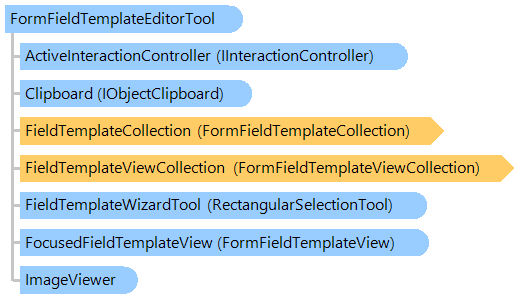
FormFieldTemplateEditorTool Class
In This Topic
Visual tool that allows to display, edit and interact with form field templates on an image.
Object Model
Syntax
'Declaration

Public Class FormFieldTemplateEditorTool
   Inherits Vintasoft.Imaging.UI.VisualTools.UserInteraction.UserInteractionVisualTool
public class FormFieldTemplateEditorTool : Vintasoft.Imaging.UI.VisualTools.UserInteraction.UserInteractionVisualTool
public __gc class FormFieldTemplateEditorTool : public Vintasoft.Imaging.UI.VisualTools.UserInteraction.UserInteractionVisualTool*
public ref class FormFieldTemplateEditorTool : public Vintasoft.Imaging.UI.VisualTools.UserInteraction.UserInteractionVisualTool^
Example
This C#/VB.NET code shows how to create a form template and add some form field templates to the form template visually.
Class FormFieldTemplateEditorToolForm
    Inherits System.Windows.Forms.Form
    Private imageViewer1 As Vintasoft.Imaging.UI.ImageViewer
    Private buildFieldTemplateButton As System.Windows.Forms.Button

    ' ...

    ''' <summary>
    ''' Form template manager.
    ''' </summary>
    Private _templateManager As Vintasoft.Imaging.FormsProcessing.FormRecognition.FormTemplateManager

    ''' <summary>
    ''' The template editor tool.
    ''' </summary>
    Private _templateEditorTool As Vintasoft.Imaging.FormsProcessing.FormRecognition.UI.VisualTools.FormFieldTemplateEditorTool

    ' ...

    Public Sub New()
        ' ...

        ' create the form field template editor tool
        _templateEditorTool = New Vintasoft.Imaging.FormsProcessing.FormRecognition.UI.VisualTools.FormFieldTemplateEditorTool()
        ' add the form field template editor tool to the image viewer
        imageViewer1.VisualTool = New Vintasoft.Imaging.UI.VisualTools.CompositeVisualTool(_templateEditorTool, _templateEditorTool.FieldTemplateWizardTool)

        AddHandler imageViewer1.FocusedIndexChanged, New System.EventHandler(Of Vintasoft.Imaging.UI.FocusedIndexChangedEventArgs)(AddressOf imageViewer1_FocusedIndexChanged)


            ' ...
        AddHandler buildFieldTemplateButton.Click, New System.EventHandler(AddressOf buildFieldTemplateButton_Click)
    End Sub

    ''' <summary>
    ''' Handles the FocusedIndexChanged event of the imageViewer1
    ''' to change the collection of form field templates of the visual tool.
    ''' </summary>
    Private Sub imageViewer1_FocusedIndexChanged(sender As Object, e As Vintasoft.Imaging.UI.FocusedIndexChangedEventArgs)
        ' if image viewer does not have image
        If imageViewer1.Image Is Nothing Then
            ' clear form field template collection in the form field template editor tool
            _templateEditorTool.FieldTemplateCollection = Nothing
        Else
            ' if image viewer haS image
            ' get the form page template for focused image
            Dim pageTemplate As Vintasoft.Imaging.FormsProcessing.FormRecognition.FormPageTemplate = _templateManager.GetPageTemplate(imageViewer1.Image)
            ' set items of page template as current items of the visual tool
            _templateEditorTool.FieldTemplateCollection = pageTemplate.Items
        End If
    End Sub

    ' ...

    ''' <summary>
    ''' Handles the Click event of the buildFieldTemplateButton
    ''' to create a form field template and start building of it.
    ''' </summary>
    Private Sub buildFieldTemplateButton_Click(sender As Object, e As System.EventArgs)
        ' create an OMR rectangular field template
        Dim fieldTemplate As Vintasoft.Imaging.FormsProcessing.FormRecognition.FormFieldTemplate = New Vintasoft.Imaging.FormsProcessing.FormRecognition.Omr.OmrRectangularFieldTemplate()
        ' create a view for the field template
        Dim fieldTemplateView As Vintasoft.Imaging.FormsProcessing.FormRecognition.UI.FormFieldTemplateView = Vintasoft.Imaging.FormsProcessing.FormRecognition.UI.FormFieldTemplateViewFactory.CreateView(fieldTemplate)

        ' add field template to the collection of visual tool and
        ' start building of field template
        _templateEditorTool.AddAndBuild(fieldTemplateView)
    End Sub

    ' ...

End Class
class FormFieldTemplateEditorToolForm : System.Windows.Forms.Form
{
    Vintasoft.Imaging.UI.ImageViewer imageViewer1;
    System.Windows.Forms.Button buildFieldTemplateButton;

    // ...

    /// <summary>
    /// Form template manager.
    /// </summary>
    Vintasoft.Imaging.FormsProcessing.FormRecognition.FormTemplateManager _templateManager;

    /// <summary>
    /// The template editor tool.
    /// </summary>
    Vintasoft.Imaging.FormsProcessing.FormRecognition.UI.VisualTools.FormFieldTemplateEditorTool _templateEditorTool;

    // ...

    public FormFieldTemplateEditorToolForm()
    {
        // ...

        // create the form field template editor tool
        _templateEditorTool =
            new Vintasoft.Imaging.FormsProcessing.FormRecognition.UI.VisualTools.FormFieldTemplateEditorTool();
        // add the form field template editor tool to the image viewer
        imageViewer1.VisualTool =
            new Vintasoft.Imaging.UI.VisualTools.CompositeVisualTool(_templateEditorTool, _templateEditorTool.FieldTemplateWizardTool);

        imageViewer1.FocusedIndexChanged +=
            new System.EventHandler<Vintasoft.Imaging.UI.FocusedIndexChangedEventArgs>(imageViewer1_FocusedIndexChanged);

        buildFieldTemplateButton.Click +=
            new System.EventHandler(buildFieldTemplateButton_Click);

        // ...
    }

    /// <summary>
    /// Handles the FocusedIndexChanged event of the imageViewer1
    /// to change the collection of form field templates of the visual tool.
    /// </summary>
    private void imageViewer1_FocusedIndexChanged(object sender, Vintasoft.Imaging.UI.FocusedIndexChangedEventArgs e)
    {
        // if image viewer does not have image
        if (imageViewer1.Image == null)
        {
            // clear form field template collection in the form field template editor tool
            _templateEditorTool.FieldTemplateCollection = null;
        }
        // if image viewer haS image
        else
        {
            // get the form page template for focused image
            Vintasoft.Imaging.FormsProcessing.FormRecognition.FormPageTemplate pageTemplate =
                _templateManager.GetPageTemplate(imageViewer1.Image);
            // set items of page template as current items of the visual tool
            _templateEditorTool.FieldTemplateCollection = pageTemplate.Items;
        }
    }

    // ...

    /// <summary>
    /// Handles the Click event of the buildFieldTemplateButton
    /// to create a form field template and start building of it.
    /// </summary>
    private void buildFieldTemplateButton_Click(object sender, System.EventArgs e)
    {
        // create an OMR rectangular field template
        Vintasoft.Imaging.FormsProcessing.FormRecognition.FormFieldTemplate fieldTemplate =
            new Vintasoft.Imaging.FormsProcessing.FormRecognition.Omr.OmrRectangularFieldTemplate();
        // create a view for the field template
        Vintasoft.Imaging.FormsProcessing.FormRecognition.UI.FormFieldTemplateView fieldTemplateView =
            Vintasoft.Imaging.FormsProcessing.FormRecognition.UI.FormFieldTemplateViewFactory.CreateView(fieldTemplate);

        // add field template to the collection of visual tool and
        // start building of field template
        _templateEditorTool.AddAndBuild(fieldTemplateView);
    }

    // ...

}
Inheritance Hierarchy
System.Object
Vintasoft.Imaging.UI.VisualTools.VisualTool
Vintasoft.Imaging.UI.VisualTools.UserInteraction.UserInteractionVisualTool
Vintasoft.Imaging.FormsProcessing.FormRecognition.UI.VisualTools.FormFieldTemplateEditorTool
Requirements
Target Platforms: .NET 10; .NET 9; .NET 8; .NET 7; .NET 6; .NET Framework 4.8, 4.7, 4.6, 4.5, 4.0, 3.5
See Also
Reference
FormFieldTemplateEditorTool Members
Vintasoft.Imaging.FormsProcessing.FormRecognition.UI.VisualTools Namespace