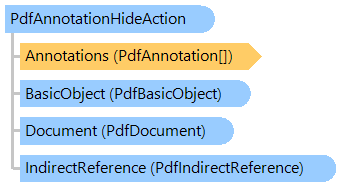
PdfAnnotationHideAction Class
In This Topic
Defines a hide action (PDF 1.2) that hides or shows one or more annotations on the screen by setting or clearing their
PdfAnnotationFlags.Hidden flag.
Object Model
Syntax
'Declaration

Public NotInheritable Class PdfAnnotationHideAction
   Inherits PdfAction
public sealed class PdfAnnotationHideAction : PdfAction
public __gc __sealed class PdfAnnotationHideAction : public PdfAction*
public ref class PdfAnnotationHideAction sealed : public PdfAction^
Example
Here is an example that shows how to create the interactive form fields and use PdfAnnotationHideAction to manage their visibility using the PdfAnnotationFlags.Hidden property:
''' <summary>
''' Tests the hide action.
''' </summary>
Public Shared Sub TestHideAction()
    ' create PDF document
    Using document As New Vintasoft.Imaging.Pdf.PdfDocument()
        ' create interactive form in PDF document
        document.InteractiveForm = New Vintasoft.Imaging.Pdf.Tree.InteractiveForms.PdfDocumentInteractiveForm(document)

        ' specify that the viewer application must construct appearance streams and
        ' appearance properties for all widget annotations
        document.InteractiveForm.NeedAppearances = True

        ' create an empty page
        Dim page As New Vintasoft.Imaging.Pdf.Tree.PdfPage(document, Vintasoft.Imaging.PaperSizeKind.A4)
        ' add page to the document
        document.Pages.Add(page)

        Dim width As Single = 100
        Dim height As Single = 30
        ' create a rectangle that defines push box position on PDF page
        Dim rect As New System.Drawing.RectangleF((page.Size.Width - width) / 2, ((page.Size.Height - height) / 3) * 2, width, height)

        ' create a push button field
        Dim button1 As Vintasoft.Imaging.Pdf.Tree.InteractiveForms.PdfInteractiveFormPushButtonField = CreateButton(document, rect, "Button1", "Button1  (hide self)")

        ' create a push button field
        rect.Y -= rect.Height + rect.Height / 2
        Dim button2 As Vintasoft.Imaging.Pdf.Tree.InteractiveForms.PdfInteractiveFormPushButtonField = CreateButton(document, rect, "Button2", "Show Button1")

        ' set the activate action
        button1.Annotation.ActivateAction = New Vintasoft.Imaging.Pdf.Tree.PdfAnnotationHideAction(True, button1.Annotation)
        button2.Annotation.ActivateAction = New Vintasoft.Imaging.Pdf.Tree.PdfAnnotationHideAction(False, button1.Annotation)

        ' set the default appearance of text
        Dim font As Vintasoft.Imaging.Pdf.Tree.Fonts.PdfFont = document.FontManager.GetStandardFont(Vintasoft.Imaging.Pdf.Tree.Fonts.PdfStandardFontType.TimesRoman)
        button1.SetTextDefaultAppearance(font, 12, System.Drawing.Color.Black)
        button2.SetTextDefaultAppearance(font, 12, System.Drawing.Color.Black)

        ' add the push button field to the interactive form of document
        document.InteractiveForm.AddField(button1, page)
        document.InteractiveForm.AddField(button2, page)

        ' save the document
        document.Save("HideActionTest.pdf")
    End Using
End Sub

''' <summary>
''' Creates the button.
''' </summary>
''' <param name="document">The document.</param>
''' <param name="rect">Button rectangle in user space.</param>
''' <param name="name">The button name.</param>
''' <param name="text">The button text.</param>
Private Shared Function CreateButton(document As Vintasoft.Imaging.Pdf.PdfDocument, rect As System.Drawing.RectangleF, name As String, text As String) As Vintasoft.Imaging.Pdf.Tree.InteractiveForms.PdfInteractiveFormPushButtonField
    ' create a push button field
    Dim button As New Vintasoft.Imaging.Pdf.Tree.InteractiveForms.PdfInteractiveFormPushButtonField(document, name, rect)

    ' set the border style
    button.Annotation.BorderStyle = New Vintasoft.Imaging.Pdf.Tree.Annotations.PdfAnnotationBorderStyle(document)
    button.Annotation.BorderStyle.Style = Vintasoft.Imaging.Pdf.Tree.Annotations.PdfAnnotationBorderStyleType.Beveled
    button.Annotation.BorderStyle.Width = 1

    ' set the appearance characteristics
    button.Annotation.AppearanceCharacteristics = New Vintasoft.Imaging.Pdf.Tree.Annotations.PdfAnnotationAppearanceCharacteristics(document)
    button.Annotation.AppearanceCharacteristics.BackgroundColor = System.Drawing.Color.LightGray
    button.Annotation.AppearanceCharacteristics.ButtonNormalCaption = text

    Return button
End Function
/// <summary>
/// Tests the hide action.
/// </summary>
public static void TestHideAction()
{
    // create PDF document
    using (Vintasoft.Imaging.Pdf.PdfDocument document = new Vintasoft.Imaging.Pdf.PdfDocument())
    {
        // create interactive form in PDF document
        document.InteractiveForm =
            new Vintasoft.Imaging.Pdf.Tree.InteractiveForms.PdfDocumentInteractiveForm(document);

        // specify that the viewer application must construct appearance streams and
        // appearance properties for all widget annotations
        document.InteractiveForm.NeedAppearances = true;

        // create an empty page
        Vintasoft.Imaging.Pdf.Tree.PdfPage page = new Vintasoft.Imaging.Pdf.Tree.PdfPage(
            document, Vintasoft.Imaging.PaperSizeKind.A4);
        // add page to the document
        document.Pages.Add(page);

        float width = 100;
        float height = 30;
        // create a rectangle that defines push box position on PDF page
        System.Drawing.RectangleF rect = new System.Drawing.RectangleF(
            (page.Size.Width - width) / 2,
            ((page.Size.Height - height) / 3) * 2,
            width, height);

        // create a push button field
        Vintasoft.Imaging.Pdf.Tree.InteractiveForms.PdfInteractiveFormPushButtonField button1 =
            CreateButton(document, rect, "Button1", "Button1  (hide self)");

        // create a push button field
        rect.Y -= rect.Height + rect.Height / 2;
        Vintasoft.Imaging.Pdf.Tree.InteractiveForms.PdfInteractiveFormPushButtonField button2 =
            CreateButton(document, rect, "Button2", "Show Button1");

        // set the activate action
        button1.Annotation.ActivateAction =
            new Vintasoft.Imaging.Pdf.Tree.PdfAnnotationHideAction(true, button1.Annotation);
        button2.Annotation.ActivateAction =
            new Vintasoft.Imaging.Pdf.Tree.PdfAnnotationHideAction(false, button1.Annotation);

        // set the default appearance of text
        Vintasoft.Imaging.Pdf.Tree.Fonts.PdfFont font = document.FontManager.GetStandardFont(
            Vintasoft.Imaging.Pdf.Tree.Fonts.PdfStandardFontType.TimesRoman);
        button1.SetTextDefaultAppearance(font, 12, System.Drawing.Color.Black);
        button2.SetTextDefaultAppearance(font, 12, System.Drawing.Color.Black);

        // add the push button field to the interactive form of document
        document.InteractiveForm.AddField(button1, page);
        document.InteractiveForm.AddField(button2, page);

        // save the document
        document.Save("HideActionTest.pdf");
    }
}

/// <summary>
/// Creates the button.
/// </summary>
/// <param name="document">The document.</param>
/// <param name="rect">Button rectangle in user space.</param>
/// <param name="name">The button name.</param>
/// <param name="text">The button text.</param>
private static Vintasoft.Imaging.Pdf.Tree.InteractiveForms.PdfInteractiveFormPushButtonField CreateButton(
    Vintasoft.Imaging.Pdf.PdfDocument document, System.Drawing.RectangleF rect, string name, string text)
{
    // create a push button field
    Vintasoft.Imaging.Pdf.Tree.InteractiveForms.PdfInteractiveFormPushButtonField button =
        new Vintasoft.Imaging.Pdf.Tree.InteractiveForms.PdfInteractiveFormPushButtonField(document, name, rect);

    // set the border style
    button.Annotation.BorderStyle = new Vintasoft.Imaging.Pdf.Tree.Annotations.PdfAnnotationBorderStyle(document);
    button.Annotation.BorderStyle.Style = Vintasoft.Imaging.Pdf.Tree.Annotations.PdfAnnotationBorderStyleType.Beveled;
    button.Annotation.BorderStyle.Width = 1;

    // set the appearance characteristics
    button.Annotation.AppearanceCharacteristics =
        new Vintasoft.Imaging.Pdf.Tree.Annotations.PdfAnnotationAppearanceCharacteristics(document);
    button.Annotation.AppearanceCharacteristics.BackgroundColor = System.Drawing.Color.LightGray;
    button.Annotation.AppearanceCharacteristics.ButtonNormalCaption = text;

    return button;
}
Inheritance Hierarchy
Requirements
Target Platforms: .NET 10; .NET 9; .NET 8; .NET 7; .NET 6; .NET Framework 4.8, 4.7, 4.6, 4.5, 4.0, 3.5
See Also