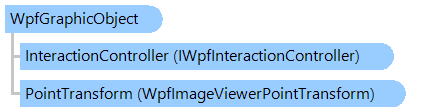
WpfGraphicObject Class
In This Topic
Provides an abstract base class for static graphic objects which can be displayed in image viewer.
Object Model
Syntax
'Declaration

<UidPropertyAttribute()>
<TypeDescriptionProviderAttribute("TypeName = MS.Internal.ComponentModel.DependencyObjectProvider")>
<NameScopePropertyAttribute("Name = NameScope", "Type = System.Windows.NameScope")>
Public MustInherit Class WpfGraphicObject
   Inherits System.Windows.UIElement
   Implements IWpfInteractiveObject
[UidProperty()]
[TypeDescriptionProvider("TypeName = MS.Internal.ComponentModel.DependencyObjectProvider")]
[NameScopeProperty("Name = NameScope", "Type = System.Windows.NameScope")]
public abstract class WpfGraphicObject : System.Windows.UIElement, IWpfInteractiveObject
[UidProperty()]
[TypeDescriptionProvider("TypeName = MS.Internal.ComponentModel.DependencyObjectProvider")]
[NameScopeProperty("Name = NameScope", "Type = System.Windows.NameScope")]
public __gc abstract class WpfGraphicObject : public System.Windows.UIElement, IWpfInteractiveObject
[UidProperty()]
[TypeDescriptionProvider("TypeName = MS.Internal.ComponentModel.DependencyObjectProvider")]
[NameScopeProperty("Name = NameScope", "Type = System.Windows.NameScope")]
public ref class WpfGraphicObject abstract : public System.Windows.UIElement, IWpfInteractiveObject
Remarks
By default the coordinate space of object is equal to the coordinate space of image viewer, i.e. object point with coordinate (0;0) coincides with the left-top point of image viewer.
The coordinate space of object can be changed using the WpfPointTransform property. Example that shows how to create static rectangle which has coordinates coincident with image coordinates can be found in Examples section.
Example
This C#/VB.NET code shows how to create a grid over an image in image viewer:
''' <summary>
''' Displays grid over image in image viewer.
''' </summary>
''' <param name="viewer">The viewer.</param>
Public Shared Sub SetGridGraphicObject(viewer As Vintasoft.Imaging.Wpf.UI.WpfImageViewer)
    ' create visual tool that can display static graphic objects in an image viewer
    Dim tool As New Vintasoft.Imaging.Wpf.UI.VisualTools.GraphicObjects.WpfGraphicObjectTool()
    ' create graphic object that displays image grid
    Dim grid As New WpfGridGraphicObject(tool)
    ' add graphic object to the visual tool
    tool.GraphicObjectCollection.Add(grid)
    ' set visual tool as current visual tool of image viewer
    viewer.VisualTool = tool
End Sub


''' <summary>
''' Represents an image grid which can be displayed in WPF image viewer.
''' </summary>
Public Class WpfGridGraphicObject
    Inherits Vintasoft.Imaging.Wpf.UI.VisualTools.GraphicObjects.WpfGraphicObject

    #Region "Fields"

    Private _tool As Vintasoft.Imaging.Wpf.UI.VisualTools.WpfVisualTool

    #End Region


    #Region "Constructors"

    ''' <summary>
    ''' Initializes a new instance of the <see cref="WpfGridGraphicObject"/> class.
    ''' </summary>
    ''' <param name="tool">The visual tool.</param>
    Public Sub New(tool As Vintasoft.Imaging.Wpf.UI.VisualTools.WpfVisualTool)
        If tool Is Nothing Then
            Throw New System.ArgumentNullException()
        End If
        _tool = tool
        Pen = New System.Windows.Media.Pen(New System.Windows.Media.SolidColorBrush(System.Windows.Media.Color.FromArgb(128, 0, 255, 0)), 1)
        PointTransform = New Vintasoft.Imaging.Wpf.UI.VisualTools.WpfPixelsToImageViewerPointTransform()
    End Sub

    #End Region


    #Region "Properties"

    Private _location As New System.Windows.Point(0, 0)
    ''' <summary>
    ''' Gets or sets the location of grid.
    ''' </summary>
    ''' <value>
    ''' Default value is <b>(0,0)</b>.
    ''' </value>
    Public Property Location() As System.Windows.Point
        Get
            Return _location
        End Get
        Set
            _location = value
        End Set
    End Property

    Private _cellSize As New System.Windows.Size(1, 1)
    ''' <summary>
    ''' Gets or sets the size of the grid cell.
    ''' </summary>
    ''' <value>
    ''' Default value is <b>(1,1)</b>.
    ''' </value>
    Public Property CellSize() As System.Windows.Size
        Get
            Return _cellSize
        End Get
        Set
            _cellSize = value
        End Set
    End Property

    Private _cellUnitOfMeasure As Vintasoft.Imaging.UnitOfMeasure = Vintasoft.Imaging.UnitOfMeasure.Centimeters
    ''' <summary>
    ''' Gets or sets the unit of measure of the grid cell.
    ''' </summary>
    ''' <value>
    ''' Default value is <b>UnitOfMeasure.Centimeters</b>.
    ''' </value>
    Public Property CellUnitOfMeasure() As Vintasoft.Imaging.UnitOfMeasure
        Get
            Return _cellUnitOfMeasure
        End Get
        Set
            _cellUnitOfMeasure = value
        End Set
    End Property

    #End Region


    #Region "Methods"

    ''' <summary>
    ''' Returns a value indicating whether point belongs the object.
    ''' </summary>
    ''' <param name="p">Point in object space.</param>
    ''' <param name="ignoreContainmentCheckDistance">A value indicating whether the point must be checked on the object only (ignore
    ''' the "containment" region around object that is used for object selection).</param>
    ''' <returns>
    ''' <b>true</b> if point belongs the object;
    ''' otherwise, <b>false</b>.
    ''' </returns>
    Public Overrides Function IsPointOnObject(p As System.Windows.Point, ignoreContainmentCheckDistance As Boolean) As Boolean
        If _tool.ImageViewer.Image IsNot Nothing AndAlso (Pen IsNot Nothing OrElse Brush IsNot Nothing) Then
            Dim rect As System.Windows.Rect = GetRectangle(_location, _tool.ImageViewer.Image)
            Return rect.Contains(p)
        Else
            Return False
        End If
    End Function

    ''' <summary>
    ''' Returns a bounding box of object, in object space.
    ''' </summary>
    ''' <returns>
    ''' Bounding box of object, in object space.
    ''' </returns>
    Public Overrides Function GetBoundingBox() As System.Windows.Rect
        If _tool.ImageViewer.Image IsNot Nothing Then
            Return GetRectangle(_location, _tool.ImageViewer.Image)
        Else
            Return System.Windows.Rect.Empty
        End If
    End Function

    ''' <summary>
    ''' Renders the object on specified <see cref="T:System.Windows.Media.DrawingContext" />
    ''' in the object space.
    ''' </summary>
    ''' <param name="viewer">An image viewer.</param>
    ''' <param name="context">A drawing context where the object must be rendered.</param>
    ''' <remarks>
    ''' This method draws object after
    ''' the <see cref="P:Vintasoft.Imaging.Wpf.UI.VisualTools.GraphicObjects.WpfGraphicObject.PointTransform" />
    ''' is applied to the DrawingContext, specified by <i>context</i> parameter.<br /><br />
    ''' By default this method does not do anything.
    ''' </remarks>
    Public Overrides Sub RenderInObjectSpace(viewer As Vintasoft.Imaging.Wpf.UI.WpfImageViewer, context As System.Windows.Media.DrawingContext)
        If viewer.Image Is Nothing Then
            Return
        End If

        Dim rect As System.Windows.Rect = GetRectangle(_location, viewer.Image)
        context.DrawRectangle(Brush, Nothing, rect)

        If Pen IsNot Nothing AndAlso Not CellSize.IsEmpty Then
            Dim cellHeight As Double = Vintasoft.Imaging.Utils.UnitOfMeasureConverter.ConvertToPixels(CellSize.Height, CellUnitOfMeasure)
            Dim countRow As Integer = CInt(Math.Truncate(System.Math.Ceiling(rect.Height / cellHeight)))

            Dim cellWidth As Double = Vintasoft.Imaging.Utils.UnitOfMeasureConverter.ConvertToPixels(CellSize.Width, CellUnitOfMeasure)
            Dim countColumn As Integer = CInt(Math.Truncate(System.Math.Ceiling(rect.Width / cellWidth)))

            If countRow > 0 AndAlso countColumn > 0 Then
                Dim x1 As Double = rect.X
                Dim y1 As Double = rect.Y + cellHeight
                Dim x2 As Double = rect.Right
                Dim i As Integer
                i = 1
                While i < countRow
                    context.DrawLine(Pen, New System.Windows.Point(x1, y1), New System.Windows.Point(x2, y1))
                    i += 1
                    y1 += cellHeight
                End While

                x1 += cellWidth
                y1 = rect.Y
                Dim y2 As Double = rect.Bottom
                i = 1
                While i < countColumn
                    context.DrawLine(Pen, New System.Windows.Point(x1, y1), New System.Windows.Point(x1, y2))
                    i += 1
                    x1 += cellWidth
                End While
            End If
        End If
    End Sub

    ''' <summary>
    ''' Creates a new <see cref="WpfGridGraphicObject"/> that is a copy of the current instance.
    ''' </summary>
    ''' <returns>
    ''' A new <see cref="WpfGridGraphicObject"/> that is a copy of this instance.
    ''' </returns>
    Public Overrides Function Clone() As Object
        Dim obj As New WpfGridGraphicObject(_tool)
        CopyTo(obj)
        Return obj
    End Function

    ''' <summary>
    ''' Copies current <see cref="WpfGridGraphicObject"/> to
    ''' the target <see cref="WpfGridGraphicObject"/>
    ''' </summary>
    ''' <param name="obj"><see cref="WpfGridGraphicObject"/> to copy.</param>
    Public Overrides Sub CopyTo(obj As Vintasoft.Imaging.Wpf.UI.VisualTools.GraphicObjects.WpfGraphicObject)
        MyBase.CopyTo(obj)

        Dim gridObj As WpfGridGraphicObject = TryCast(obj, WpfGridGraphicObject)
        If gridObj IsNot Nothing Then
            gridObj.Location = Location
            gridObj.CellSize = CellSize
            gridObj.CellUnitOfMeasure = CellUnitOfMeasure
        End If
    End Sub

    ''' <summary>
    ''' Gets the rectangle of grid.
    ''' </summary>
    ''' <param name="location">The location.</param>
    ''' <param name="image">The image.</param>
    Private Function GetRectangle(location As System.Windows.Point, image As Vintasoft.Imaging.VintasoftImage) As System.Windows.Rect
        Dim rect As New System.Windows.Rect(_location.X, _location.Y, image.Width - _location.X, image.Height - _location.Y)
        Return rect
    End Function

    #End Region

End Class
/// <summary>
/// Displays grid over image in image viewer.
/// </summary>
/// <param name="viewer">The viewer.</param>
public static void SetGridGraphicObject(Vintasoft.Imaging.Wpf.UI.WpfImageViewer viewer)
{
    // create visual tool that can display static graphic objects in an image viewer
    Vintasoft.Imaging.Wpf.UI.VisualTools.GraphicObjects.WpfGraphicObjectTool tool =
        new Vintasoft.Imaging.Wpf.UI.VisualTools.GraphicObjects.WpfGraphicObjectTool();
    // create graphic object that displays image grid
    WpfGridGraphicObject grid = new WpfGridGraphicObject(tool);
    // add graphic object to the visual tool
    tool.GraphicObjectCollection.Add(grid);
    // set visual tool as current visual tool of image viewer
    viewer.VisualTool = tool;
}


/// <summary>
/// Represents an image grid which can be displayed in WPF image viewer.
/// </summary>
public class WpfGridGraphicObject : Vintasoft.Imaging.Wpf.UI.VisualTools.GraphicObjects.WpfGraphicObject
{

    #region Fields

    Vintasoft.Imaging.Wpf.UI.VisualTools.WpfVisualTool _tool;

    #endregion


    #region Constructors

    /// <summary>
    /// Initializes a new instance of the <see cref="WpfGridGraphicObject"/> class.
    /// </summary>
    /// <param name="tool">The visual tool.</param>
    public WpfGridGraphicObject(Vintasoft.Imaging.Wpf.UI.VisualTools.WpfVisualTool tool)
    {
        if (tool == null)
            throw new System.ArgumentNullException();
        _tool = tool;
        Pen = new System.Windows.Media.Pen(
            new System.Windows.Media.SolidColorBrush(System.Windows.Media.Color.FromArgb(128, 0, 255, 0)), 1);
        PointTransform = new Vintasoft.Imaging.Wpf.UI.VisualTools.WpfPixelsToImageViewerPointTransform();
    }

    #endregion


    #region Properties

    System.Windows.Point _location = new System.Windows.Point(0, 0);
    /// <summary>
    /// Gets or sets the location of grid.
    /// </summary>
    /// <value>
    /// Default value is <b>(0,0)</b>.
    /// </value>
    public System.Windows.Point Location
    {
        get
        {
            return _location;
        }
        set
        {
            _location = value;
        }
    }

    System.Windows.Size _cellSize = new System.Windows.Size(1, 1);
    /// <summary>
    /// Gets or sets the size of the grid cell.
    /// </summary>
    /// <value>
    /// Default value is <b>(1,1)</b>.
    /// </value>
    public System.Windows.Size CellSize
    {
        get
        {
            return _cellSize;
        }
        set
        {
            _cellSize = value;
        }
    }

    Vintasoft.Imaging.UnitOfMeasure _cellUnitOfMeasure =
        Vintasoft.Imaging.UnitOfMeasure.Centimeters;
    /// <summary>
    /// Gets or sets the unit of measure of the grid cell.
    /// </summary>
    /// <value>
    /// Default value is <b>UnitOfMeasure.Centimeters</b>.
    /// </value>
    public Vintasoft.Imaging.UnitOfMeasure CellUnitOfMeasure
    {
        get
        {
            return _cellUnitOfMeasure;
        }
        set
        {
            _cellUnitOfMeasure = value;
        }
    }

    #endregion


    #region Methods

    /// <summary>
    /// Returns a value indicating whether point belongs the object.
    /// </summary>
    /// <param name="p">Point in object space.</param>
    /// <param name="ignoreContainmentCheckDistance">A value indicating whether the point must be checked on the object only (ignore
    /// the "containment" region around object that is used for object selection).</param>
    /// <returns>
    /// <b>true</b> if point belongs the object;
    /// otherwise, <b>false</b>.
    /// </returns>
    public override bool IsPointOnObject(System.Windows.Point p, bool ignoreContainmentCheckDistance)
    {
        if (_tool.ImageViewer.Image != null &&
            (Pen != null || Brush != null))
        {
            System.Windows.Rect rect = GetRectangle(_location, _tool.ImageViewer.Image);
            return rect.Contains(p);
        }
        else
            return false;
    }

    /// <summary>
    /// Returns a bounding box of object, in object space.
    /// </summary>
    /// <returns>
    /// Bounding box of object, in object space.
    /// </returns>
    public override System.Windows.Rect GetBoundingBox()
    {
        if (_tool.ImageViewer.Image != null)
            return GetRectangle(_location, _tool.ImageViewer.Image);
        else
            return System.Windows.Rect.Empty;
    }

    /// <summary>
    /// Renders the object on specified <see cref="T:System.Windows.Media.DrawingContext" />
    /// in the object space.
    /// </summary>
    /// <param name="viewer">An image viewer.</param>
    /// <param name="context">A drawing context where the object must be rendered.</param>
    /// <remarks>
    /// This method draws object after
    /// the <see cref="P:Vintasoft.Imaging.Wpf.UI.VisualTools.GraphicObjects.WpfGraphicObject.PointTransform" />
    /// is applied to the DrawingContext, specified by <i>context</i> parameter.<br /><br />
    /// By default this method does not do anything.
    /// </remarks>
    public override void RenderInObjectSpace(
        Vintasoft.Imaging.Wpf.UI.WpfImageViewer viewer, System.Windows.Media.DrawingContext context)
    {
        if (viewer.Image == null)
            return;

        System.Windows.Rect rect = GetRectangle(_location, viewer.Image);
        context.DrawRectangle(Brush, null, rect);

        if (Pen != null && !CellSize.IsEmpty)
        {
            double cellHeight = Vintasoft.Imaging.Utils.UnitOfMeasureConverter.ConvertToPixels(
                CellSize.Height, CellUnitOfMeasure);
            int countRow = (int)System.Math.Ceiling(rect.Height / cellHeight);

            double cellWidth = Vintasoft.Imaging.Utils.UnitOfMeasureConverter.ConvertToPixels(
                CellSize.Width, CellUnitOfMeasure);
            int countColumn = (int)System.Math.Ceiling(rect.Width / cellWidth);

            if (countRow > 0 && countColumn > 0)
            {
                double x1 = rect.X;
                double y1 = rect.Y + cellHeight;
                double x2 = rect.Right;
                int i;
                for (i = 1; i < countRow; i++, y1 += cellHeight)
                    context.DrawLine(Pen, new System.Windows.Point(x1, y1), new System.Windows.Point(x2, y1));

                x1 += cellWidth;
                y1 = rect.Y;
                double y2 = rect.Bottom;
                for (i = 1; i < countColumn; i++, x1 += cellWidth)
                    context.DrawLine(Pen, new System.Windows.Point(x1, y1), new System.Windows.Point(x1, y2));
            }
        }
    }

    /// <summary>
    /// Creates a new <see cref="WpfGridGraphicObject"/> that is a copy of the current instance.
    /// </summary>
    /// <returns>
    /// A new <see cref="WpfGridGraphicObject"/> that is a copy of this instance.
    /// </returns>
    public override object Clone()
    {
        WpfGridGraphicObject obj = new WpfGridGraphicObject(_tool);
        CopyTo(obj);
        return obj;
    }

    /// <summary>
    /// Copies current <see cref="WpfGridGraphicObject"/> to
    /// the target <see cref="WpfGridGraphicObject"/>
    /// </summary>
    /// <param name="obj"><see cref="WpfGridGraphicObject"/> to copy.</param>
    public override void CopyTo(Vintasoft.Imaging.Wpf.UI.VisualTools.GraphicObjects.WpfGraphicObject obj)
    {
        base.CopyTo(obj);

        WpfGridGraphicObject gridObj = obj as WpfGridGraphicObject;
        if (gridObj != null)
        {
            gridObj.Location = Location;
            gridObj.CellSize = CellSize;
            gridObj.CellUnitOfMeasure = CellUnitOfMeasure;
        }
    }

    /// <summary>
    /// Gets the rectangle of grid.
    /// </summary>
    /// <param name="location">The location.</param>
    /// <param name="image">The image.</param>
    private System.Windows.Rect GetRectangle(System.Windows.Point location, Vintasoft.Imaging.VintasoftImage image)
    {
        System.Windows.Rect rect = new System.Windows.Rect(
            _location.X, _location.Y,
            image.Width - _location.X, image.Height - _location.Y);
        return rect;
    }

    #endregion

}
Inheritance Hierarchy
System.Object
System.Windows.Threading.DispatcherObject
System.Windows.DependencyObject
System.Windows.Media.Visual
System.Windows.UIElement
Vintasoft.Imaging.Wpf.UI.VisualTools.GraphicObjects.WpfGraphicObject
Vintasoft.Imaging.Dicom.Wpf.UI.VisualTools.WpfImageRulerGraphicObject
Vintasoft.Imaging.Wpf.UI.VisualTools.GraphicObjects.WpfGraphicObjectGroup
Vintasoft.Imaging.Wpf.UI.VisualTools.GraphicObjects.WpfRectangularGraphicObject
Vintasoft.Imaging.Wpf.UI.VisualTools.GraphicObjects.WpfPathGraphicObject
Requirements
Target Platforms: .NET 11; .NET 10; .NET 9; .NET 8; .NET 6; .NET Framework 4.8, 4.7, 4.6, 4.5, 4.0, 3.5
See Also