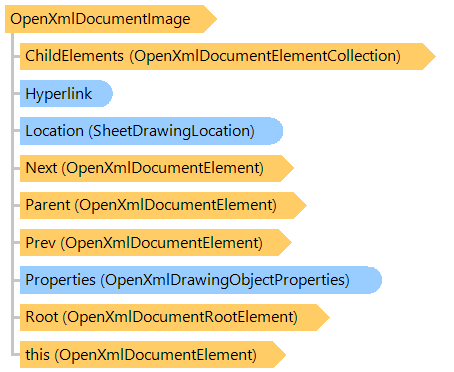
OpenXmlDocumentImage Class
Represents an image of an Open XML document.
This C#/VB.NET code shows how to set barcode image in DOCX document (example uses template document SetBarcodeImage_template.docx):
Public Shared Sub DocxSetBarcodeImageExample()
    Dim templateFilename As String = "SetBarcodeImage_template.docx"
    Dim outFilename As String = "SetBarcodeImage.docx"
    Dim outPdfFilename As String = "SetBarcodeImage.pdf"

    ' create DocxDocumentEditor that allows to edit file "SetBarcodeImage_template.docx"
    Using editor As New Vintasoft.Imaging.Office.OpenXml.Editor.Docx.DocxDocumentEditor(templateFilename)
        ' get document body
        Dim documentBody As Vintasoft.Imaging.Office.OpenXml.Editor.OpenXmlDocumentElement = editor.Body

        ' find text content "Invoice number:"
        Dim textContent As Vintasoft.Imaging.Office.OpenXml.Editor.OpenXmlTextContent = documentBody.FindText("Invoice number:")

        ' get barcode value as text of next paragraph after "Invoice number:"
        Dim barcodeValue As String = textContent.FindAfter(Of Vintasoft.Imaging.Office.OpenXml.Editor.OpenXmlDocumentParagraph)().Text
        barcodeValue = barcodeValue.TrimEnd(ControlChars.Lf)

        ' create and setup barcode generator
        Dim barcodeGenerator As New Vintasoft.Barcode.BarcodeWriter()
        barcodeGenerator.Settings.Barcode = Vintasoft.Barcode.BarcodeType.QR
        barcodeGenerator.Settings.SetWidth(200)
        barcodeGenerator.Settings.Value = barcodeValue

        ' generate barcode image
        Using barcodeImage As New Vintasoft.Imaging.VintasoftImage(barcodeGenerator.GetBarcodeAsVintasoftBitmap(), True)
            ' crop barcode to rectangular image
            barcodeImage.Crop(New System.Drawing.Rectangle(0, 0, barcodeImage.Width, barcodeImage.Width))

            ' set barcode image to DOCX image at index 0
            editor.Images(0).SetImage(barcodeImage)
        End Using

        ' save changed document to a DOCX file
        editor.Save(outFilename)

        ' export changed document to a PDF document
        editor.Export(outPdfFilename)
    End Using
End Sub
public static void DocxSetBarcodeImageExample()
{
    string templateFilename = "SetBarcodeImage_template.docx";
    string outFilename = "SetBarcodeImage.docx";
    string outPdfFilename = "SetBarcodeImage.pdf";

    // create DocxDocumentEditor that allows to edit file "SetBarcodeImage_template.docx"
    using (Vintasoft.Imaging.Office.OpenXml.Editor.Docx.DocxDocumentEditor editor =
        new Vintasoft.Imaging.Office.OpenXml.Editor.Docx.DocxDocumentEditor(templateFilename))
    {
        // get document body
        Vintasoft.Imaging.Office.OpenXml.Editor.OpenXmlDocumentElement documentBody = editor.Body;

        // find text content "Invoice number:"
        Vintasoft.Imaging.Office.OpenXml.Editor.OpenXmlTextContent textContent = documentBody.FindText("Invoice number:");

        // get barcode value as text of next paragraph after "Invoice number:"
        string barcodeValue = textContent.FindAfter<Vintasoft.Imaging.Office.OpenXml.Editor.OpenXmlDocumentParagraph>().Text;
        barcodeValue = barcodeValue.TrimEnd('\n');

        // create and setup barcode generator
        Vintasoft.Barcode.BarcodeWriter barcodeGenerator = new Vintasoft.Barcode.BarcodeWriter();
        barcodeGenerator.Settings.Barcode = Vintasoft.Barcode.BarcodeType.QR;
        barcodeGenerator.Settings.SetWidth(200);
        barcodeGenerator.Settings.Value = barcodeValue;

        // generate barcode image
        using (Vintasoft.Imaging.VintasoftImage barcodeImage =
            new Vintasoft.Imaging.VintasoftImage(barcodeGenerator.GetBarcodeAsVintasoftBitmap(), true))
        {
            // crop barcode to rectangular image
            barcodeImage.Crop(new System.Drawing.Rectangle(0, 0, barcodeImage.Width, barcodeImage.Width));

            // set barcode image to DOCX image at index 0
            editor.Images[0].SetImage(barcodeImage);
        }

        // save changed document to a DOCX file
        editor.Save(outFilename);

        // export changed document to a PDF document
        editor.Export(outPdfFilename);
    }
}
Target Platforms: .NET 11; .NET 10; .NET 9; .NET 8; .NET 6; .NET Framework 4.8, 4.7, 4.6, 4.5, 4.0, 3.5