How to rotate image with annotations?
In This Topic
1. JavaScript API for rotating image with annotations in HTML5 web browser
If image with annotations is displayed in web annotation viewer and it is necessary to rotate image with annotations, the
WebAnnotationViewControllerJS.rotateImageWithAnnotation function should be used.
Here is JavaScript code that shows how to rotate image with annotations in web annotation viewer:
// create an annotation viewer
var annotationViewer = new Vintasoft.Imaging.Annotation.UI.WebAnnotationViewerJS("WebAnnotationViewer1");
...

// get image that is focused in annotation viewer
var image = annotationViewer.get_FocusedImage();
// if annotation viewer has focused image
if (image != null) {
    // get annotation controller that is associated with annotation viewer
    var annotationController = annotationViewer.get_AnnotationController();
    // rotate image with annotations in annotation viewer
    annotationController.rotateImageWithAnnotation(
        image,
        45,                                                             // rotation angle in degrees
        "rgb(255,255,255)",                                             // border color
        new Vintasoft.Imaging.WebBorderColorTypeEnumJS("Custom"),       // specify that border color, which is specified by previous parameter, must be used
        true,                                                           // specify that changes must be saved to a source file
        __annotationController_rotateImageWithAnnotation_success,
        __annotationController_rotateImageWithAnnotation_error);
}


/*
 * Image with annotations is successfully rotated.
 */
function __annotationController_rotateImageWithAnnotation_success(data) {
    alert('Image with annotations is successfully rotated.');
}

/*
 * Image with annotations is not rotated.
 */
function __annotationController_rotateImageWithAnnotation_error(data) {
    alert('Image with annotations is not rotated.');
}
2. Web Document Viewer UI for rotating image with annotations in HTML5 web browser
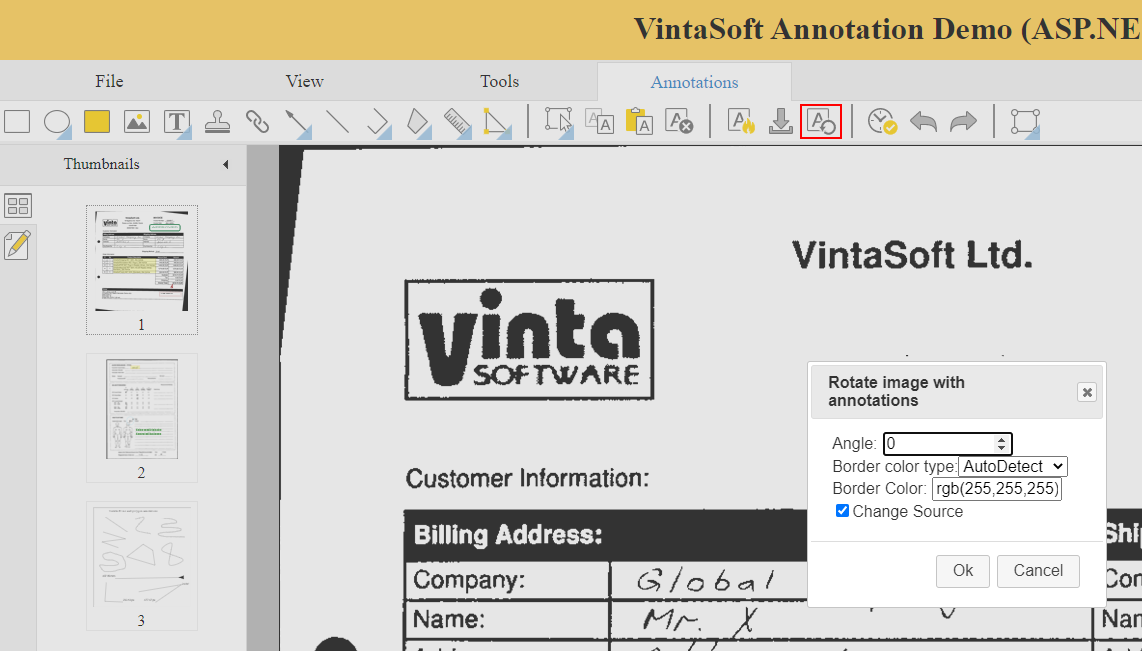
By default annotation toolbar contains "annotationActionsToolbarPanel" panel that contains "rotateImageWithAnnotationsButton" button. "RotateImageWithAnnotationsButton" button display dialog that allows to rotate image with annotations in annotation viewer.
Here is screenshot of annotation toolbar in web application ("rotateImageWithAnnotationsButton" button is marked with red rectangle):