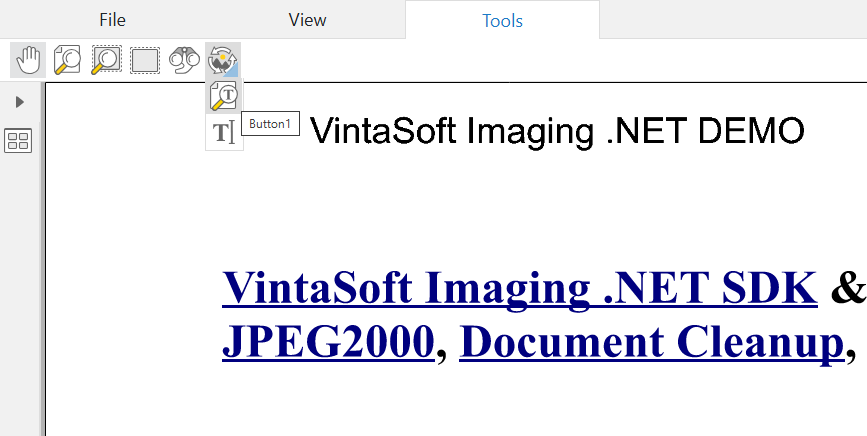
Create button with a drop-down button list for Web Document Viewer UI
In This Topic
Here is JavaScript code that shows how to create button with a drop-down button list and add created button to the "Tools" menu in VintaSoft web document viewer:
/**
 Initializes main menu of Vintasoft web document viewer.
 @param {object} docViewerSettings Settings of Vintasoft web document viewer.
*/
function __initMenu(docViewerSettings) {
    // get items of document viewer
    var items = docViewerSettings.get_Items();

    // get the main menu of document viewer
    var mainMenu = items.getItemByRegisteredId("mainMenu");
    // if main menu is found
    if (mainMenu != null) {
        // get items of main menu
        var mainMenuItems = mainMenu.get_Items();

        // get "Tools" menu in web document viewer
        var toolsToolbarPanel = mainMenuItems.getItemByRegisteredId("toolsMenuPanel");
        // get items of "Tools" menu
        var toolsToolbarPanelItems = toolsToolbarPanel.get_Items();

        // create the first button
        var button1 = new Vintasoft.Imaging.UI.UIElements.WebUiButtonJS({
            cssClass: "vsui-button vsdv-sidePanel-textSearchPanelButton",
            title: "Button1",
            localizationId: "button1",
            onClick: function (event, uiElement) {
                alert('Button1 is clicked.');
            }
        });

        // create the second button
        var button2 = new Vintasoft.Imaging.UI.UIElements.WebUiButtonJS({
            cssClass: "vsui-button vsdv-sidePanel-textSelectionPanelButton",
            title: "Button2",
            localizationId: "button2",
            onClick: function (event, uiElement) {
                alert('Button2 is clicked.');
            }
        });

        // create a button with drop-down button list
        var buttonWithDropDownButtonList = new Vintasoft.Imaging.UI.UIElements.WebUiButtonWithDropDownButtonListJS(
            {
                cssClass: "vsui-button vsdv-sidePanel-imageProcessingPanelButton",
                title: "Button with drop-down button List",
                localizationId: "buttonWithDropDownButtonList1"
            },
            [
                button1, button2
            ],
            { cssClass: "vsui-dropDownPanel" });

        // add button with drop-down button list to the "Tools" menu in web document viewer
        toolsToolbarPanelItems.addItem(buttonWithDropDownButtonList);
    }
}
Here is screenshot of VintaSoft web document viewer with button with drop-down button list, which was created using JS-code above: