"Standard" dialogs, which are used in Web Document Editor UI
In This Topic
By default the Web Document Editor uses the following "standard" dialogs:
- WebUiDocumentEditorSettingsDialogJS - web UI-dialog that allows to view and edit settings of document editor.
- WebUiDocumentEditorViewSettingsDialogJS - web UI-dialog that allows to view and change the page view settings of document editor.
- WebUiDocumentInfoDialogJS - web UI-dialog that allows to view and edit information about document.
- WebUiPrintDocxDocumentSettingsDialogJS - web UI-dialog that allows to print pages of DOCX document, which is shown in web document editor.
- WebUiDocumentPageSettingsDialogJS - web UI-dialog that allows to view and edit settings of document page.
- WebUiDocumentPageColumnsSettingsDialogJS - web UI-dialog that allows to view and edit the columns settings of document page.
- WebUiDocumentTextPropertiesDialogJS - web UI-dialog that allows to view and edit properties for text, which is selected in document.
- WebUiDocumentParagraphPropertiesDialogJS - web UI-dialog that allows to view and edit properties for paragraph, which is selected in document.
- WebUiDocumentParagraphIndentationSettingsDialogJS - web UI-dialog that allows to view and edit the indentation for document paragraph.
- WebUiDocumentParagraphLineSpacingSettingsDialogJS - web UI-dialog that allows to view and edit the line spacing for document paragraph.
- WebUiDocumentParagraphPaginationSettingsDialogJS - web UI-dialog that allows to view and edit the pagination settings for document paragraph.
1. "Standard" dialogs, which are based on Bootstrap
Ready-to-use "standard" dialogs, which are based on Bootstrap dialog, are stored in Vintasoft.Imaging.Office.Dialogs.Bootstrap.js file.If "standard" Bootstrap dialogs must be used in the web document editor, web application must have:
-
link to the CSS-file of Bootstrap, for example:
-
link to the jQuery and Bootstrap libraries, for example:
-
link to the Vintasoft.Imaging.js, Vintasoft.Imaging.css, Vintasoft.Imaging.Office.js, Vintasoft.Imaging.Office.css, Vintasoft.Imaging.Dialogs.Bootstrap.js and Vintasoft.Imaging.Office.Dialogs.Bootstrap.js files, for example:
Dialog appearance can be customized using Bootstrap CSS.
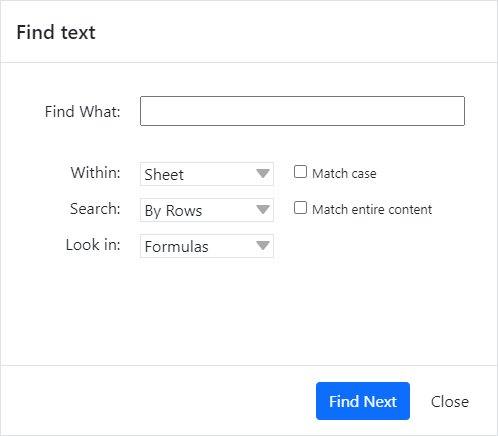
Here is screenshot of "standard" "Find text" dialog, which is based on Bootstrap:
2. "Standard" dialogs, which are based on jQuery UI
Ready-to-use "standard" dialogs, which are based on jQuery UI-dialog, are stored in Vintasoft.Imaging.Office.Dialogs.jQueryUI.js file.If "standard" jQueryUI-dialogs must be used in the web document editor, web application must have:
-
link to the CSS-file of jQuery UI, for example:
-
link to the jQuery and jQuery UI libraries, for example:
-
link to the Vintasoft.Imaging.js, Vintasoft.Imaging.css, Vintasoft.Imaging.Office.js, Vintasoft.Imaging.Office.css, Vintasoft.Imaging.Dialogs.jQueryUI.js and Vintasoft.Imaging.Office.Dialogs.jQueryUI.js files, for example:
Dialog appearance can be customized using jQuery UI CSS.
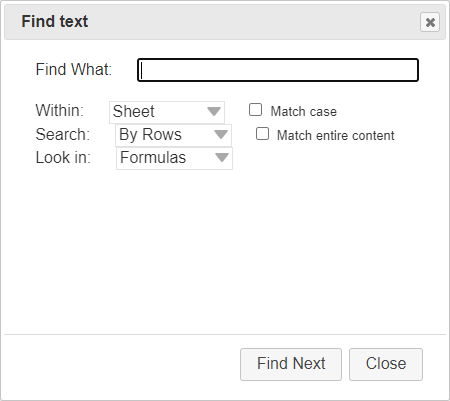
Here is screenshot of "standard" "Find text" dialog, which is based on jQuery UI:
3. Custom "standard" dialogs
If ready-to-use "standard" Bootstrap, jQuery UI and JavaScript dialogs are not suitable for your UI or task, it is possible to use custom "standard" dialogs in web document viewer.If it is necessary to create custom dialog for another UI library, it is recommended to create dialog as a wrapper around ready-to-use UI-panel (WebUiDocumentEditorSettingsPanelJS, WebUiDocumentEditorViewSettingsPanelJS, WebUiDocumentInfoPanelJS, WebUiPrintDocxDocumentSettingsPanelJS, WebUiDocumentPageSettingsPanelJS, WebUiDocumentPageColumnsSettingsPanelJS, WebUiDocumentTextPropertiesPanelJS, WebUiDocumentParagraphPropertiesPanelJS, WebUiDocumentParagraphIndentationSettingsPanelJS, WebUiDocumentParagraphLineSpacingSettingsPanelJS, WebUiDocumentParagraphPaginationSettingsPanelJS). In this case it is not necessary to implement logic, which is related with dialog (for example, print images) because panel already contains all necessary logic.
Also it is possible to create "custom" dialog from scratch but in this case it is necessary to implement dialog UI and logic.