In This Topic
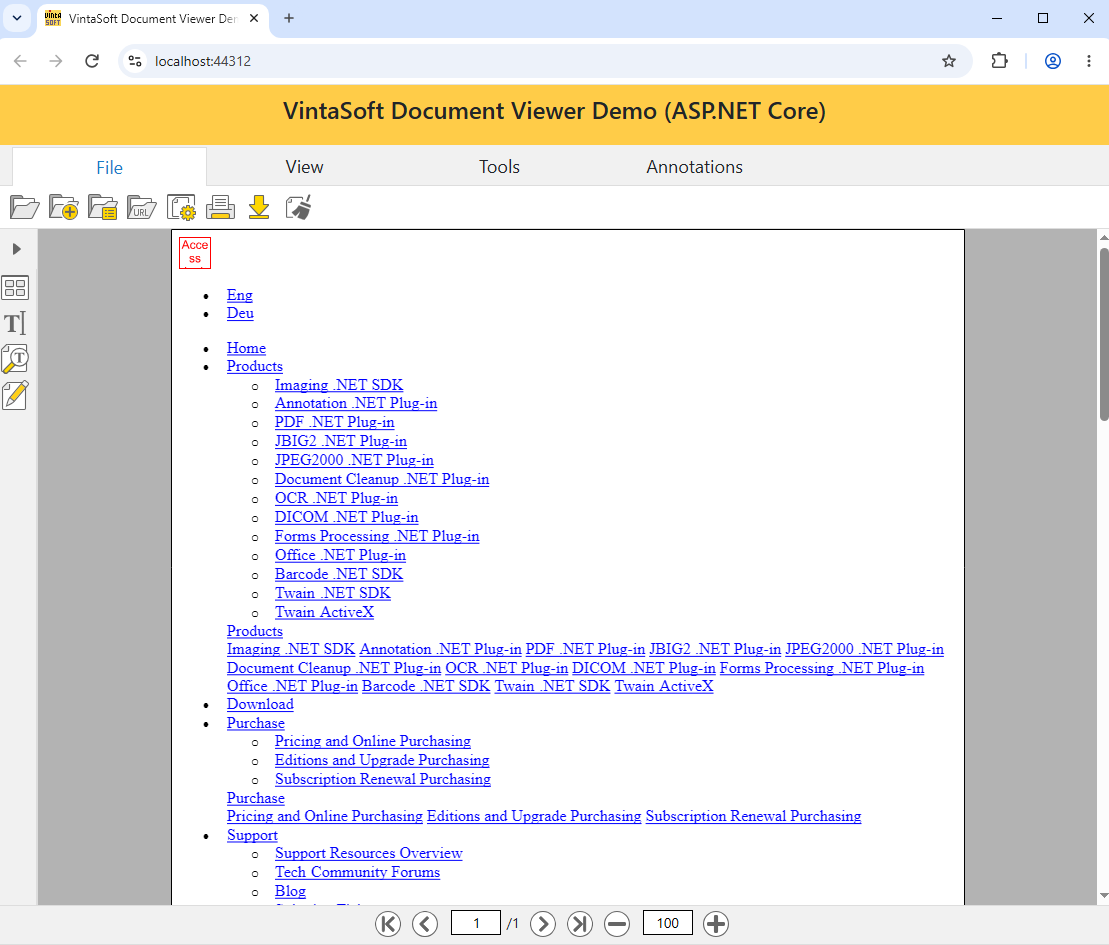
VintaSoft web document viewer and VintaSoft web image viewer can render HTML page.
HTML page can contain links to the external resources (CSS-files, image files, ...). By default VintaSoft web viewer does not allow to load external resources for security reasons, i.e. VintaSoft web viewer renders HTML page without external css-styles and images.
Here is a screenshot of VintaSoft web document viewer with HTML page (https://www.vintasoft.com/index.html) that is rendered without external css-styles and images:
VintaSoft web viewer allows to enable loading of external resources, i.e. render HTML page with external css-styles and images.
Here is a screenshot of VintaSoft web document viewer with HTML page (https://www.vintasoft.com/index.html) that is rendered with css-styles and images:

If it is necessary to enable loading of all external resources, the following steps should be made:
- Set value of the Vintasoft.Imaging.Web.Services.VintasoftImageWebService.AllowAccessToExternalResources property to True.
Here is C# code that demonstrates how to enable loading of all external resources in VintaSoft web document viewer:
using Microsoft.AspNetCore.Builder;
using Microsoft.AspNetCore.Hosting;
using Microsoft.Extensions.Configuration;
using Microsoft.Extensions.DependencyInjection;
using Microsoft.Extensions.Hosting;
using Vintasoft.Imaging;

namespace AspNetCoreDocumentViewerDemo
{
    public class Startup
    {

        public Startup(IConfiguration configuration)
        {
            Configuration = configuration;
        }


        public IConfiguration Configuration { get; }


        // This method gets called by the runtime. Use this method to add services to the container.
        public void ConfigureServices(IServiceCollection services)
        {
            // set the custom font program controller as the default font program controller
            CustomFontProgramsController.SetDefaultFontProgramsController();

            // specify that VintaSoft Imaging .NET SDK should use SkiaSharp library for drawing of 2D graphics
            Vintasoft.Imaging.Drawing.SkiaSharp.SkiaSharpDrawingFactory.SetAsDefault();

            // specify that VintaSoft image web service can access the external resources
            Vintasoft.Imaging.Web.Services.VintasoftImageWebService.AllowAccessToExternalResources = true;

            services.AddControllersWithViews().AddNewtonsoftJson();
            services.AddSession();
        }
...
If it is necessary to enable loading of external resources and manage access to the external resources, the following steps should be made:
- Set value of the Vintasoft.Imaging.Web.Services.VintasoftImageWebService.AllowAccessToExternalResources property to True.
- Subscribe to the Vintasoft.Imaging.ImagingEnvironment.ExternalResourceManager.VerifyResourceAccess event and manage access to the external resources.
Here is C# code that demonstrates how to enable loading of external resources in VintaSoft web document viewer and allow access to the external resources on "https://www.vintasoft.com" only:
using Microsoft.AspNetCore.Builder;
using Microsoft.AspNetCore.Hosting;
using Microsoft.Extensions.Configuration;
using Microsoft.Extensions.DependencyInjection;
using Microsoft.Extensions.Hosting;
using Vintasoft.Imaging;

namespace AspNetCoreDocumentViewerDemo
{
    public class Startup
    {

        public Startup(IConfiguration configuration)
        {
            Configuration = configuration;
        }


        public IConfiguration Configuration { get; }


        // This method gets called by the runtime. Use this method to add services to the container.
        public void ConfigureServices(IServiceCollection services)
        {
            // set the custom font program controller as the default font program controller
            CustomFontProgramsController.SetDefaultFontProgramsController();

            // specify that VintaSoft Imaging .NET SDK should use SkiaSharp library for drawing of 2D graphics
            Vintasoft.Imaging.Drawing.SkiaSharp.SkiaSharpDrawingFactory.SetAsDefault();

            // specify that VintaSoft image web service can access the external resources
            Vintasoft.Imaging.Web.Services.VintasoftImageWebService.AllowAccessToExternalResources = true;
            // subscribe to the ExternalResourceManager.VerifyResourceAccess event to manage access to the external resources
            ImagingEnvironment.ExternalResourceManager.VerifyResourceAccess += ExternalResourceManager_VerifyResourceAccess;

            services.AddControllersWithViews().AddNewtonsoftJson();
            services.AddSession();
        }

        private void ExternalResourceManager_VerifyResourceAccess(object sender, ExternalResourceVerifyAccessEventArgs e)
        {
            e.IsAccessAllowed = false;
            if (e.Uri.ToString().StartsWith("https://www.vintasoft.com"))
                e.IsAccessAllowed = true;
        }
...