Create the toggle button for Web Document Viewer UI
In This Topic
Here is JavaScript code that shows how to create the toggle button and add created button to the "Tools" menu in VintaSoft web document viewer:
/**
 Initializes main menu of Vintasoft web document viewer.
 @param {object} docViewerSettings Settings of Vintasoft web document viewer.
*/
function __initMenu(docViewerSettings) {
    // get items of document viewer
    var items = docViewerSettings.get_Items();

    // get the main menu of document viewer
    var mainMenu = items.getItemByRegisteredId("mainMenu");
    // if main menu is found
    if (mainMenu != null) {
        // get items of main menu
        var mainMenuItems = mainMenu.get_Items();

        // get "Tools" menu in web document viewer
        var toolsToolbarPanel = mainMenuItems.getItemByRegisteredId("toolsMenuPanel");
        // get items of "Tools" menu
        var toolsToolbarPanelItems = toolsToolbarPanel.get_Items();

        // create the first button
        var button1 = new Vintasoft.Imaging.UI.UIElements.WebUiButtonJS({
            cssClass: "vsui-button vsdv-sidePanel-textSearchPanelButton",
            title: "Button1",
            localizationId: "button1",
            onClick: function (event, uiElement) {
                alert('Button1 is clicked.');
            }
        });

        // create the second button
        var button2 = new Vintasoft.Imaging.UI.UIElements.WebUiButtonJS({
            cssClass: "vsui-button vsdv-sidePanel-textSelectionPanelButton",
            title: "Button2",
            localizationId: "button2",
            onClick: function (event, uiElement) {
                alert('Button2 is clicked.');
            }
        });

        // create the toggle button
        var toggleButton1 = new Vintasoft.Imaging.UI.UIElements.WebUiToggleButtonJS(
            { raiseClickEventWhenTogglePanelOpening: false },
            [button1, button2],
            { cssClass: "vsui-togglePanel" });

        // add the toggle button to the "Tools" menu in web document viewer
        toolsToolbarPanelItems.addItem(toggleButton1);
    }
}
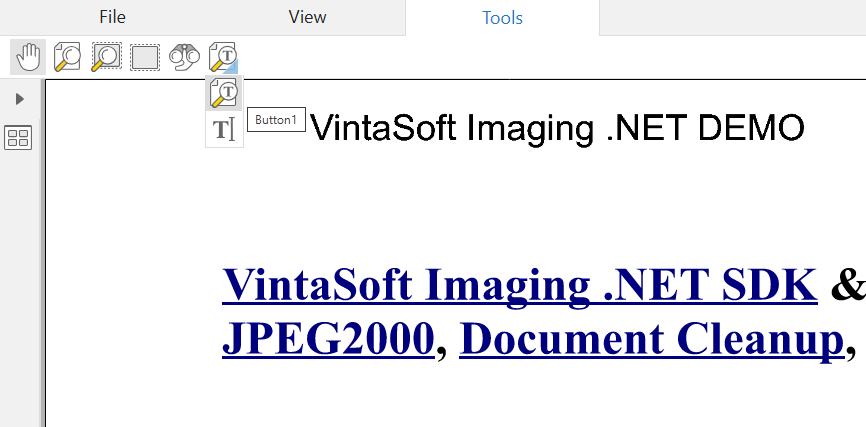
Here is screenshot of VintaSoft web document viewer with the toggle button, which was created using JS-code above: